

In today’s fast-paced digital world, users expect instant responses from websites and applications. However, many businesses still rely on manual support systems, which often leads to delays and poor user experience. As a result, potential customers may leave your platform before receiving assistance.
To solve this problem, developers are increasingly integrating AI-powered chatbots into web applications. Not only do these chatbots provide real-time responses, but they also automate customer interactions and reduce operational costs.
If you are building modern web applications, learning how to integrate AI with ASP.NET Core can give you a strong competitive advantage. Additionally, it helps you create smarter, more interactive systems.
Before proceeding, you may review the official ASP.NET Core documentation to strengthen your fundamentals. Furthermore, you can explore latest .NET updates to stay current with industry trends.
📑 Table of Contents
- What is an AI Chatbot?
- Why Use AI Chatbot in ASP.NET?
- System Architecture
- Requirements
- Step-by-Step Implementation
- Frontend Integration
- Real-World Use Cases
- Common Errors and Fixes
- Deployment Guide
- Benefits of AI Chatbots
- FAQ
- Conclusion
🧠 What is an AI Chatbot?
An AI chatbot is a software application that uses artificial intelligence to simulate human-like conversations. It understands user queries using Natural Language Processing (NLP) and generates relevant responses.
Unlike traditional bots, modern AI chatbots can learn from interactions. Therefore, they improve accuracy over time and provide better user experiences.
💡 Why Use AI Chatbot in ASP.NET?
- Automate customer support
- Provide 24/7 availability
- Improve user engagement
- Reduce operational costs
- Increase conversion rates
Moreover, integrating AI with ASP.NET Core allows developers to build scalable and enterprise-level applications.
🔍 System Architecture
Understanding the architecture is essential before implementation. It helps you design scalable and maintainable systems.
- First, the user sends a message from the frontend interface
- Next, the ASP.NET Core API receives the request
- After that, the API forwards the request to the AI service
- Then, the AI processes the message and generates a response
- Finally, the response is returned to the user
As a result, ASP.NET Core works as a middleware between the frontend and the AI system.
⚙️ Requirements
- ASP.NET Core Web API
- Visual Studio or VS Code
- Basic C# knowledge
- AI API (OpenAI or Azure)
🛠️ Step-by-Step Implementation
Step 1: Create Project
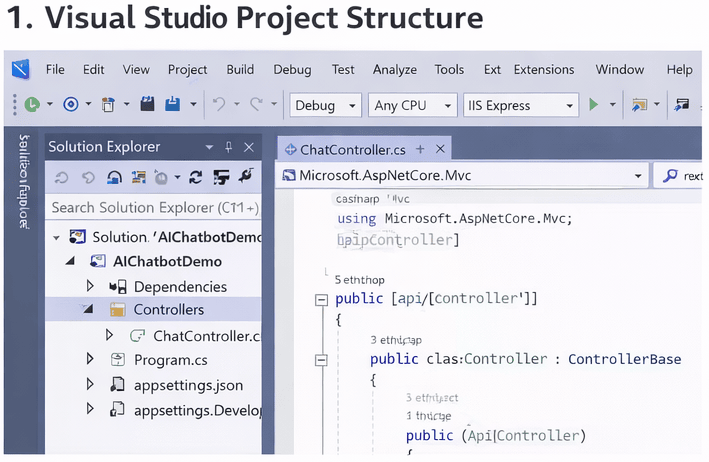
Figure: ASP.NET Core Chatbot API response in Postman
First, create a new ASP.NET Core Web API project using the following command:
dotnet new webapi -n AIChatbotDemo
cd AIChatbotDemo
Step 2: Install Package
dotnet add package Newtonsoft.Json
Step 3: Create Chat Controller
using Microsoft.AspNetCore.Mvc;
using System.Net.Http;
using System.Text;
using System.Threading.Tasks;
using Newtonsoft.Json;

[Route("api/[controller]")]
[ApiController]
public class ChatController : ControllerBase
{
    private readonly HttpClient _httpClient = new HttpClient();

    [HttpPost]
    public async Task GetResponse([FromBody] string userMessage)
    {
        var apiKey = "YOUR_API_KEY";

        var requestBody = new
        {
            model = "gpt-3.5-turbo",
            messages = new[]
            {
                new { role = "user", content = userMessage }
            }
        };

        var content = new StringContent(
            JsonConvert.SerializeObject(requestBody),
            Encoding.UTF8,
            "application/json"
        );

        _httpClient.DefaultRequestHeaders.Add("Authorization", $"Bearer {apiKey}");

        var response = await _httpClient.PostAsync("https://api.openai.com/v1/chat/completions", content);

        var result = await response.Content.ReadAsStringAsync();

        return Ok(result);
    }
}
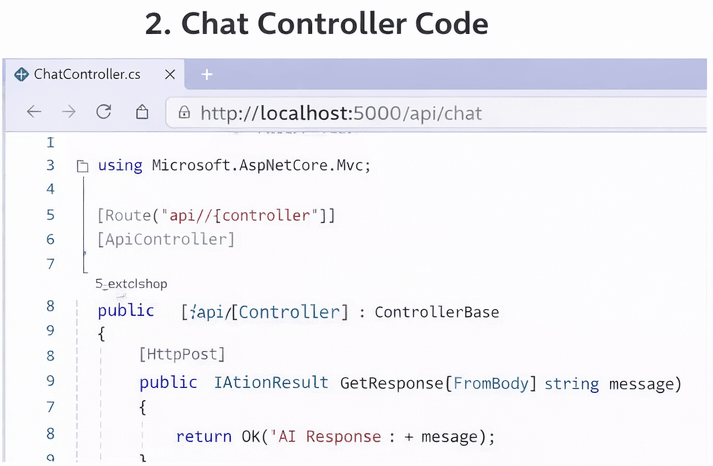
Figure: ASP.NET Core Chatbot API response in Postman
🌐 Frontend Integration
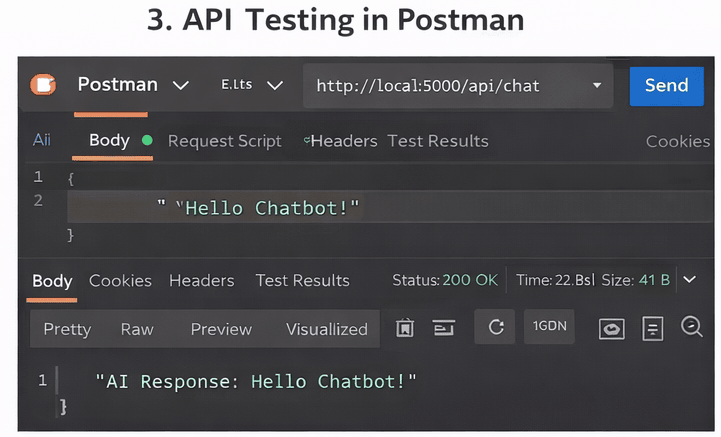
Figure: ASP.NET Core Chatbot API response in Postman
To interact with the chatbot, create a simple frontend interface:
<input type="text" id="msg" placeholder="Type message">
<button onclick="send()">Send</button>
<p id="res"></p>

<script>
async function send(){
 let msg = document.getElementById("msg").value;

 let res = await fetch('/api/chat',{
  method:'POST',
  headers:{'Content-Type':'application/json'},
  body: JSON.stringify(msg)
 });

 let data = await res.text();
 document.getElementById("res").innerText = data;
}
</script>
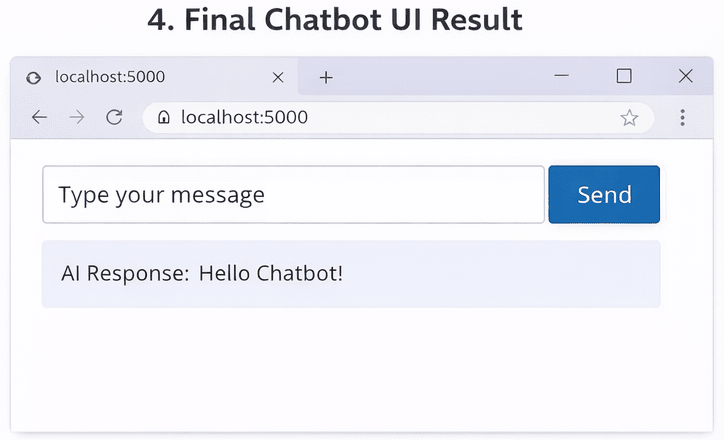
Figure: ASP.NET Core Chatbot API response in Postman
💼 Real-World Use Cases
- Customer support automation
- Lead generation chatbot
- FAQ automation system
- E-commerce assistant
If you want to understand how websites generate leads, visit
professional web development examples.
⚠️ Common Errors and Fixes
Invalid API Key
Ensure that your API key is correct. Otherwise, the request will fail and no response will be generated.
CORS Issue
In many cases, frontend requests are blocked due to CORS restrictions. Therefore, you should enable CORS in your ASP.NET Core application.
Slow Response
Sometimes the chatbot responds slowly due to API latency. In such cases, consider optimizing API calls or implementing caching mechanisms.
🚀 Deployment Guide
Once your chatbot is ready, the next step is deployment. Depending on your requirements, you can choose from multiple hosting options.
- For example, you can deploy on IIS (Windows Server)
- Alternatively, you can use Azure App Services for cloud hosting
- In addition, shared hosting platforms are also an option
Overall, cloud deployment is recommended because it ensures better scalability and reliability.
📈 Benefits of AI Chatbots
- Firstly, they provide 24/7 availability
- Secondly, they deliver instant responses
- Moreover, they improve user engagement
- In addition, they help reduce operational costs
- Finally, they enhance overall customer experience
Furthermore, integrating AI chatbots into web applications is becoming a standard practice in modern development. As technology evolves, businesses are increasingly adopting automation tools to improve efficiency. Therefore, developers who learn this skill early can gain a significant advantage in the industry.
❓ FAQ
Is ASP.NET Core suitable for AI chatbots?
Yes, it is highly scalable and works well with AI APIs.
Can I use free APIs?
Yes, but paid APIs are recommended for production use.
How can I earn from chatbot development?
You can offer services, build SaaS products, or freelance.
Conclusion & Next Steps
In conclusion, integrating AI chatbots into ASP.NET Core applications is a valuable skill in 2026. Not only does it enhance user experience, but it also opens new opportunities in modern software development.Moreover, developers can leverage this integration to build scalable and intelligent systems. As a result, businesses can automate processes and improve efficiency.
Instead of relying on manual support, organizations can adopt AI-driven solutions to handle user queries more effectively. This approach ultimately leads to better engagement and higher customer satisfaction.To stay competitive, it is important to keep learning and experimenting with new technologies. Therefore, start building your AI chatbot today and take your development skills to the next level.
Developing intelligent, real-time AI solutions requires a strong grip on modern enterprise patterns. Enhance your backend capabilities with our Advanced .NET Development: The Complete Guide for Enterprise Applications. You can also review how to structure robust API endpoints in How to Create an ASP.NET Core Web API, enable instant client responses using SignalR Real-Time Chat App in ASP.NET Core, and safeguard your endpoints via JWT Authentication in ASP.NET Core.