ASP.NET Core vs ASP.NET Difference: Complete Comparison, Performance Insights, and Future Scope

ASP.NET Core vs ASP.NET Difference: Complete Comparison, Performance Insights, and Future Scope
Understanding the ASP.NET Core vs ASP.NET difference helps developers select the right technology for modern web applications. Before starting any project, evaluating the ASP.NET Core vs ASP.NET difference can save both development time and infrastructure costs.
While both frameworks serve the purpose of web development, they differ in architecture, performance, deployment, and flexibility. In this article, we will explore a detailed comparison to help you choose the right framework.
Choosing the correct framework is not only a technical decision but also a business decision. The framework you select affects application performance, maintenance costs, deployment options, scalability, and future upgrades. Developers, software architects, and business owners should understand these differences before starting a new project or planning to modernize an existing application.
Although ASP.NET and ASP.NET Core share a similar purpose, they were designed during different eras of software development. Traditional ASP.NET was built when Windows servers dominated enterprise environments. In contrast, ASP.NET Core was developed for today’s cloud-first world, where applications are expected to run efficiently across multiple operating systems and integrate seamlessly with containers, cloud platforms, and distributed architectures.
Whether you are a beginner learning Microsoft technologies or an experienced developer maintaining enterprise software, understanding the ASP.NET Core vs ASP.NET difference will help you make informed development decisions and prepare for future technology trends.
What is ASP.NET?
ASP.NET is a mature web development framework built on the .NET Framework and primarily designed for Windows environments. It has been widely used for enterprise applications over the years.
Introduced by Microsoft in the early 2000s, ASP.NET became one of the most popular frameworks for developing dynamic websites, enterprise portals, e-commerce platforms, and internal business applications. It simplified web development by providing server-side controls, powerful libraries, and built-in security features that reduced development time.
Many large organizations continue to use ASP.NET because their applications have been running reliably for years. Industries such as banking, healthcare, insurance, manufacturing, and government often maintain critical systems developed using ASP.NET. These applications usually integrate with existing Windows infrastructure, Active Directory, SQL Server, and other Microsoft technologies.
From a developer’s perspective, ASP.NET provides a stable and well-documented environment. Developers familiar with Web Forms or ASP.NET MVC can efficiently maintain legacy applications without significant architectural changes. However, expanding these applications for modern cloud-native environments may require additional planning and infrastructure.
One important consideration is that ASP.NET depends on the .NET Framework, which is designed specifically for Windows. While this provides excellent compatibility with Windows-based enterprise systems, it limits deployment flexibility compared to newer technologies.
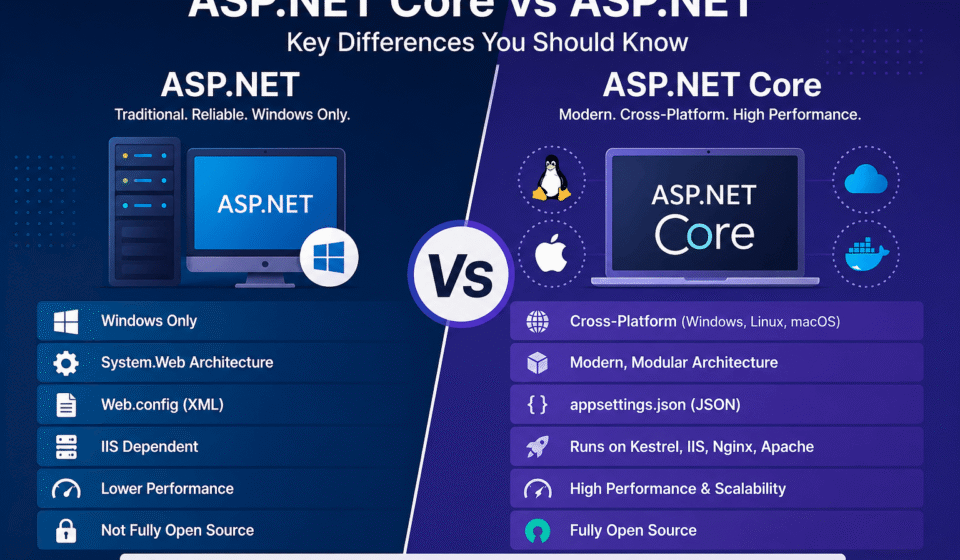
- Runs only on Windows
- Uses System.Web architecture
- Supports Web Forms, MVC, and Web API
- Dependent on IIS (Internet Information Services)
- Uses web.config (XML-based configuration)
These capabilities made ASP.NET the preferred framework for enterprise development for many years. Even today, thousands of production applications continue to rely on its mature ecosystem, comprehensive documentation, and extensive third-party library support.
What is ASP.NET Core?
ASP.NET Core is a modern, open-source, cross-platform framework designed to build cloud-based applications, APIs, and microservices with high performance.
Microsoft introduced ASP.NET Core to address the limitations of the traditional ASP.NET framework while embracing modern software development practices. Instead of extending the older architecture, Microsoft redesigned the framework from the ground up to deliver better speed, flexibility, and modularity.
Unlike its predecessor, ASP.NET Core is capable of running on Windows, Linux, and macOS without requiring major code changes. This cross-platform capability allows organizations to choose the most cost-effective hosting environment while giving developers greater freedom during deployment.
ASP.NET Core also emphasizes modular development. Developers can include only the libraries and middleware required by an application instead of loading unnecessary components. This approach reduces memory usage, improves startup time, and enhances overall application performance.
Modern software development increasingly relies on REST APIs, cloud computing, containers, and continuous integration pipelines. ASP.NET Core was designed with these requirements in mind. Features such as dependency injection, middleware, logging, configuration providers, and asynchronous programming are built directly into the framework, making development cleaner and more maintainable.
For beginners, ASP.NET Core provides a simpler and more organized project structure compared to older ASP.NET applications. Configuration files are easier to manage, startup logic is more transparent, and dependency management follows modern software engineering practices.
- Cross-platform (Windows, Linux, macOS)
- Lightweight and modular architecture
- Built-in Dependency Injection
- Supports cloud and microservices
- Uses appsettings.json for configuration
As organizations increasingly migrate workloads to Azure, AWS, Google Cloud, and hybrid environments, ASP.NET Core continues to be Microsoft’s recommended framework for building scalable and future-ready web applications.
ASP.NET Core vs ASP.NET Difference (Detailed Comparison)
1. Platform Support
ASP.NET runs only on Windows, whereas ASP.NET Core supports Windows, Linux, and macOS. This makes ASP.NET Core ideal for modern cloud-based deployments.
Cross-platform support is one of the biggest reasons organizations choose ASP.NET Core for new projects. Instead of being restricted to Windows servers, applications can be deployed on Linux virtual machines, Docker containers, Kubernetes clusters, or cloud-hosted platforms without changing the application code.
This flexibility also helps reduce infrastructure costs. Many cloud providers offer cost-effective Linux hosting options, enabling businesses to scale applications while keeping operational expenses under control. Development teams working on different operating systems can collaborate more efficiently because the same project can run consistently across multiple environments.
For enterprise organizations, platform independence improves disaster recovery planning and deployment flexibility. Applications are no longer tied to a single operating system, allowing infrastructure teams to optimize hosting based on performance, cost, or compliance requirements.
2. Performance
ASP.NET Core offers significantly better performance due to its lightweight design and optimized request pipeline. It handles high traffic more efficiently than ASP.NET.
Performance improvements come from multiple architectural enhancements rather than a single feature. ASP.NET Core minimizes unnecessary processing, uses an optimized middleware pipeline, and supports asynchronous programming extensively. These improvements allow applications to serve more requests while consuming fewer server resources.
In real-world scenarios, this means faster page loading, lower CPU utilization, and improved scalability during peak traffic. High-traffic APIs, e-commerce platforms, SaaS products, and enterprise portals particularly benefit from these optimizations because they can process thousands of concurrent requests more efficiently.
Developers can further improve application performance by implementing response caching, compression, asynchronous database access, efficient logging, and optimized middleware ordering. Since ASP.NET Core gives developers greater control over the request pipeline, unnecessary processing can easily be eliminated.
A common mistake is assuming that simply migrating from ASP.NET to ASP.NET Core automatically guarantees maximum performance. The application architecture, database queries, caching strategy, and coding practices still play a significant role. Well-written ASP.NET Core applications typically outperform poorly optimized applications regardless of the framework version.
3. Architecture
ASP.NET follows a monolithic architecture using System.Web, while ASP.NET Core uses a modular architecture, allowing developers to include only necessary components.
The architectural difference directly impacts maintainability and scalability. Traditional ASP.NET loads a large collection of built-in features through the System.Web assembly, even when an application uses only a small subset of them. This increases resource consumption and limits customization opportunities.
ASP.NET Core replaces this approach with a modular design built around middleware. Each middleware component performs a specific responsibility such as authentication, routing, logging, exception handling, or static file serving. Developers can arrange these components according to application requirements, resulting in a cleaner and more efficient request-processing pipeline.
From a software engineering perspective, modular architecture improves code organization, testing, and long-term maintenance. Teams can independently develop and update different application components without affecting unrelated functionality. This approach also aligns well with clean architecture principles and modern enterprise development practices.
For organizations building large-scale distributed systems, the modular nature of ASP.NET Core simplifies integration with APIs, cloud services, authentication providers, monitoring tools, and third-party libraries while keeping the application easier to maintain as business requirements evolve.
4. Dependency Injection
ASP.NET Core has built-in Dependency Injection support, making applications more maintainable and testable compared to ASP.NET.
Dependency Injection (DI) is one of the most valuable features introduced in ASP.NET Core. Instead of creating object instances manually throughout the application, developers register services once and let the framework provide them wherever they are needed. This results in cleaner code with fewer dependencies between components.
For beginners, Dependency Injection may seem like an advanced concept, but it simply means that classes receive the objects they need instead of creating them internally. For example, a controller can receive a database service or logging service through its constructor, making the application easier to understand and maintain.
In enterprise applications, built-in DI significantly improves code quality. Large development teams can replace implementations without changing business logic, making feature enhancements and bug fixes more efficient. It also simplifies automated unit testing because mock services can easily replace real implementations during testing.
Traditional ASP.NET applications often require third-party Dependency Injection containers to achieve similar functionality. ASP.NET Core eliminates this requirement by providing a built-in service container that supports singleton, scoped, and transient service lifetimes. This reduces complexity and ensures consistent dependency management throughout the application.
A common best practice is to register only the services required by the application and avoid creating unnecessary dependencies. Proper service lifetime selection also helps prevent memory leaks and improves application performance.
5. Hosting Flexibility
ASP.NET requires IIS, whereas ASP.NET Core can run on multiple servers like Kestrel, IIS, Nginx, and Apache.
Hosting flexibility is one of the biggest architectural improvements in ASP.NET Core. Developers are no longer restricted to Internet Information Services (IIS). Instead, they can choose the hosting environment that best fits their infrastructure, budget, and deployment strategy.
The built-in Kestrel web server provides excellent performance and serves as the primary web server for ASP.NET Core applications. In production environments, Kestrel is commonly used behind reverse proxy servers such as IIS on Windows or Nginx and Apache on Linux for enhanced security, load balancing, and request management.
Cloud providers also benefit from this flexibility. Applications can be deployed to Azure App Service, Amazon Web Services, Google Cloud Platform, Docker containers, Kubernetes clusters, or virtual machines with minimal configuration changes. This makes ASP.NET Core an excellent choice for organizations adopting cloud-native development.
For development teams practicing DevOps and continuous deployment, flexible hosting simplifies automated deployments across development, testing, staging, and production environments. The same application can run consistently regardless of the underlying operating system or hosting platform.
6. Configuration System
ASP.NET uses web.config (XML), while ASP.NET Core uses appsettings.json, environment variables, and command-line configuration.
Configuration management has been completely redesigned in ASP.NET Core. Instead of depending solely on XML-based configuration files, developers can combine multiple configuration sources to build flexible and secure applications. This approach supports modern deployment practices where configuration values often differ between development, testing, and production environments.
The use of appsettings.json provides a cleaner and more readable structure for application settings. Developers can organize database connections, API keys, logging settings, feature flags, and application options in a structured format that is easier to maintain than traditional XML files.
Another major advantage is support for environment-specific configuration files such as appsettings.Development.json and appsettings.Production.json. This enables developers to maintain separate settings for each deployment environment without modifying the application source code.
Enterprise organizations also benefit from secure configuration management through environment variables and external secret stores. Sensitive information like passwords, connection strings, and API credentials should never be hardcoded into configuration files. ASP.NET Core makes it easier to follow these security best practices.
Developers should regularly review configuration settings to remove unused values, secure confidential information, and ensure consistency across deployment environments.
7. Open Source
ASP.NET Core is fully open-source and maintained on GitHub, allowing community contributions and faster updates.
Being open source provides several advantages beyond simply accessing the source code. Developers can review framework implementations, understand internal behavior, report issues, contribute improvements, and follow upcoming changes directly through Microsoft’s public development process.
The active open-source community also accelerates innovation. New features, performance improvements, bug fixes, and security updates are continuously discussed and implemented with feedback from developers around the world. This collaborative approach helps ensure that ASP.NET Core evolves according to real-world development needs.
Businesses benefit from greater transparency because they are not dependent on closed development processes. Organizations can monitor framework updates, evaluate changes before upgrading production systems, and take advantage of frequent performance and security enhancements.
Another advantage is the rich ecosystem surrounding ASP.NET Core. Thousands of open-source libraries, extensions, templates, and development tools integrate seamlessly with the framework, enabling faster application development while reducing implementation effort.
8. Cloud & Microservices Support
ASP.NET Core is built for cloud-native applications and supports Docker and Kubernetes, making it ideal for microservices architecture.
Modern software development increasingly relies on cloud infrastructure and distributed systems. ASP.NET Core was specifically designed to support these architectures by providing lightweight services, efficient networking capabilities, and seamless containerization support.
Microservices divide large applications into smaller independent services that can be developed, deployed, and scaled individually. ASP.NET Core provides an excellent foundation for building these services because of its modular architecture, high performance, and built-in support for RESTful APIs.
Container technologies such as Docker allow developers to package applications with all required dependencies, ensuring consistent behavior across development, testing, and production environments. Kubernetes further enhances this approach by automating deployment, scaling, load balancing, and service management for large enterprise applications.
Cloud-native capabilities also improve application resilience. Individual services can be updated without affecting the entire system, making deployments safer and reducing downtime. This approach is particularly beneficial for large e-commerce platforms, financial applications, healthcare systems, SaaS products, and enterprise solutions that require continuous availability.
When building new applications intended for long-term growth, ASP.NET Core provides the flexibility, scalability, and cloud integration capabilities needed to support modern business requirements while preparing organizations for future technological advancements.
ASP.NET Core vs ASP.NET Difference in Performance
In terms of speed, scalability, and resource utilization, ASP.NET Core outperforms ASP.NET. Its optimized middleware pipeline and asynchronous programming model contribute to faster response times.
Performance is one of the primary reasons organizations choose ASP.NET Core for new development. The framework minimizes unnecessary processing and allows developers to build lightweight applications that consume fewer CPU and memory resources. As a result, servers can handle more concurrent users without requiring additional hardware.
The asynchronous programming model in ASP.NET Core helps applications remain responsive even when performing database operations, file processing, or external API calls. Instead of blocking threads while waiting for operations to complete, the framework efficiently utilizes system resources, leading to improved throughput and better scalability.
Real-world enterprise applications such as e-commerce platforms, online banking portals, booking systems, and SaaS products benefit significantly from these performance improvements. Faster response times enhance the user experience, reduce server costs, and improve overall application reliability during periods of heavy traffic.
Developers should remember that framework performance alone is not enough. Database optimization, caching strategies, efficient API design, proper indexing, compression, and optimized middleware configuration all contribute to the overall speed of an application. Following performance best practices throughout the development lifecycle produces the best long-term results.
ASP.NET Core vs ASP.NET Difference: When to Use ASP.NET?
Although ASP.NET Core is Microsoft’s recommended framework for modern development, traditional ASP.NET still remains a practical choice in several situations. Many organizations operate business-critical applications that have been running successfully for years and do not require immediate migration.
Migrating a large enterprise application can involve significant development effort, extensive testing, and infrastructure changes. If an existing ASP.NET application meets current business requirements, performs well, and receives regular maintenance, continuing with the existing framework may be more cost-effective until modernization becomes necessary.
Organizations that rely heavily on Windows-specific technologies, legacy third-party libraries, or older enterprise integrations may also prefer to continue using ASP.NET. In such cases, maintaining application stability often takes priority over adopting new technologies.
- Maintaining legacy applications
- Applications dependent on Windows-only features
- Existing enterprise systems with heavy investments
Before deciding to continue with ASP.NET, organizations should evaluate long-term maintenance costs, future scalability requirements, security updates, and modernization goals. This evaluation helps determine the right time for a gradual migration strategy.
ASP.NET Core vs ASP.NET Difference: When to Use ASP.NET Core?
ASP.NET Core should be the preferred choice for almost every new web development project. Its modern architecture, cross-platform compatibility, cloud readiness, and excellent performance make it suitable for startups as well as large enterprise organizations.
Businesses planning digital transformation initiatives can take advantage of ASP.NET Core’s flexibility to build scalable web applications, RESTful APIs, cloud-native solutions, and distributed systems. The framework integrates well with DevOps pipelines, container technologies, and modern deployment platforms, making continuous delivery much easier.
Developers also benefit from improved productivity through built-in dependency injection, simplified configuration management, advanced logging, middleware, and support for the latest .NET ecosystem. These features reduce development complexity while improving application maintainability over time.
- Building new web applications
- Creating REST APIs
- Developing microservices
- Cloud-based deployments
- Cross-platform applications
If your project requires high performance, long-term scalability, cloud integration, container deployment, or cross-platform support, ASP.NET Core is the framework that best aligns with modern software development practices and future technology trends.
ASP.NET Core vs ASP.NET Difference and Migration Guide
Migrating to ASP.NET Core can improve performance and scalability, but it requires proper planning.
Every migration project begins with a detailed assessment of the existing application. Development teams should identify business-critical modules, third-party dependencies, authentication mechanisms, reporting components, and external integrations before starting the migration process. A proper assessment reduces unexpected challenges during implementation.
Not every feature from traditional ASP.NET has a direct equivalent in ASP.NET Core. Applications using Web Forms or older libraries may require partial redesign or redevelopment. Instead of attempting a complete migration in one phase, many organizations adopt an incremental migration strategy that modernizes individual modules over time.
Comprehensive testing is equally important throughout the migration process. Functional testing, integration testing, performance testing, and security validation help ensure that the new application behaves consistently while taking advantage of ASP.NET Core’s architectural improvements.
Large enterprises often migrate gradually by exposing existing functionality through APIs and rebuilding individual modules using ASP.NET Core. This approach minimizes business disruption while allowing teams to modernize applications without lengthy downtime.
- Analyze the existing application
- Identify dependencies
- Rewrite incompatible modules
- Test thoroughly before deployment
A successful migration should include documentation updates, developer training, deployment planning, monitoring, and post-deployment performance analysis. Careful planning significantly reduces project risks and ensures a smoother transition to the modern framework.
Visit the official Microsoft documentation here:
ASP.NET Core Documentation
The official documentation provides comprehensive tutorials, API references, deployment guides, security recommendations, and performance optimization techniques. Whether you are a beginner learning the fundamentals or an experienced developer implementing enterprise solutions, Microsoft’s documentation is an excellent resource for understanding the latest features and recommended development practices.
Conclusion and Next Step
The ASP.NET Core vs ASP.NET difference clearly shows that ASP.NET Core is the future of web development. It is faster, more flexible, and designed for modern cloud-based environments. While ASP.NET is still relevant for legacy systems, developers should prefer ASP.NET Core for new projects.
When comparing both frameworks, the decision largely depends on your project requirements. Existing enterprise applications that rely on Windows-specific technologies may continue operating efficiently on ASP.NET, whereas new applications benefit from the modern architecture, performance improvements, and cloud-native capabilities offered by ASP.NET Core. Understanding these differences helps developers choose the right framework while planning future upgrades more effectively.
For individual developers, learning ASP.NET Core is a valuable long-term investment. The framework continues to receive active development, regular feature enhancements, and strong community support. Organizations around the world increasingly prefer ASP.NET Core for web applications, APIs, and microservices, making it an essential skill for modern .NET professionals.
Now that you understand the ASP.NET Core vs ASP.NET difference, the next step is to build a stronger foundation in ASP.NET Core development. If you’re just getting started, explore our What is ASP.NET Core? (Complete Beginner Guide 2026) to learn the fundamentals. After that, follow the How to Create an ASP.NET Core Project Step by Step for Beginners tutorial to build your first application. To better understand how requests are processed, read our detailed guide on Middleware in ASP.NET Core Explained. Finally, improve the maintainability and scalability of your applications by learning Dependency Injection in ASP.NET Core, one of the framework’s most important features.