
ASP.NET Web Services (ASMX) Tutorial with Examples
ASP.NET Web Services Tutorial: In modern web development, applications often need to communicate with external systems such as payment gateways, weather APIs, or news feeds. Instead of building everything from scratch, developers can reuse existing services. ASP.NET Web Services (ASMX) provide a simple way to expose and consume business logic over the internet using standard protocols like HTTP and XML.
Before the rise of REST APIs and cloud-native architectures, ASP.NET Web Services (ASMX) were among the most widely adopted technologies for application integration. They enabled organizations to share business functionality securely across multiple systems without requiring clients to understand the application’s internal implementation. Even today, many enterprise applications continue to rely on ASMX services for legacy integrations.
Learning ASP.NET Web Services remains valuable for developers who maintain existing .NET Framework applications or participate in migration projects. Understanding how SOAP-based communication works also provides a strong foundation for learning modern service-oriented architectures and enterprise integration patterns.
Although many organizations now prefer RESTful APIs, numerous banking systems, healthcare platforms, ERP solutions, insurance applications, and government portals still expose SOAP-based services. Therefore, understanding ASMX web services continues to be an important skill for enterprise developers.
📌 What Are ASP.NET Web Services?
Web Services are software components that allow applications to communicate over a network. They enable interoperability between different platforms and programming languages.
A web service exposes specific business functionality that other applications can consume remotely. Instead of directly accessing another application’s database or source code, client applications invoke predefined methods exposed by the web service. This separation improves security, maintainability, and system scalability.
One of the biggest advantages of ASP.NET Web Services is platform independence. Since SOAP messages are transmitted using XML over HTTP, applications developed in Java, PHP, Python, .NET, or other programming languages can communicate with the same service provided they understand the SOAP protocol.
For example, an eCommerce website may expose an order processing service that external warehouse software consumes automatically. Similarly, banking systems often expose account verification or transaction services that are securely accessed by partner applications without sharing their internal business logic.
- Platform independent
- Language independent
- Uses XML-based communication
- Accessible via HTTP
These characteristics made ASP.NET Web Services one of Microsoft’s primary technologies for distributed application development before the introduction of Windows Communication Foundation (WCF) and ASP.NET Web API.
📊 ASP.NET Web Services Architecture Diagram
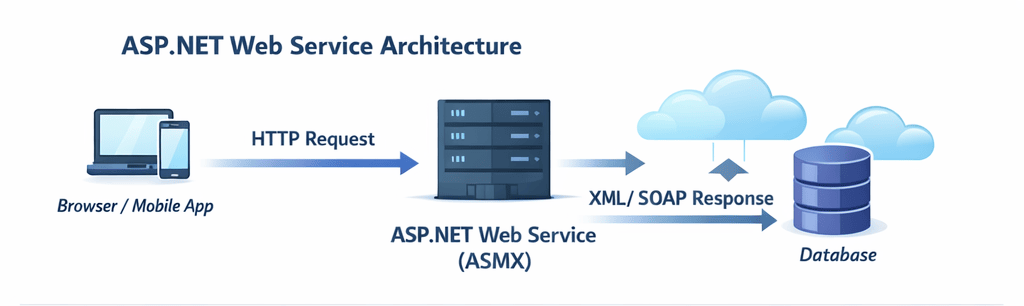
The diagram above shows how a client sends a request to a web service, which processes it and returns a response.
The architecture generally consists of three major components: the client application, the web service hosted on IIS, and the backend database or business layer. The client sends a SOAP request over HTTP, the service validates and processes the request, executes business logic, retrieves or updates data if necessary, and finally returns an XML response to the client.
Because communication occurs through standardized protocols, both the client and server remain loosely coupled. As long as the service contract remains unchanged, internal implementation details can evolve without affecting consuming applications. This flexibility was one of the major reasons organizations adopted service-oriented architecture (SOA).
Enterprise systems often include multiple client applications consuming the same web service simultaneously. Desktop software, mobile applications, reporting tools, and third-party partner systems can all interact with the same service endpoint, promoting code reuse and centralized business logic.
⚙️ How ASP.NET Web Services Work
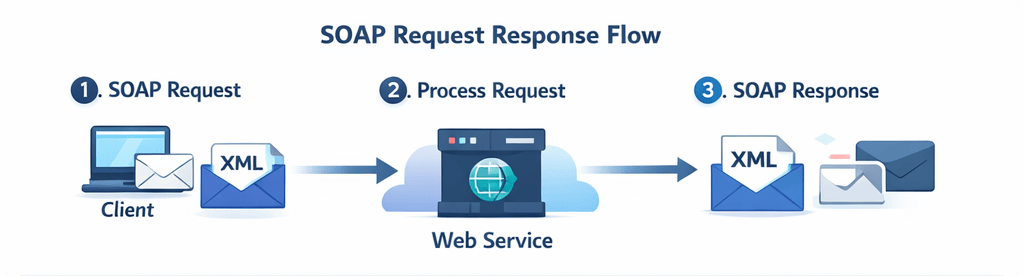
- Client sends request (SOAP/XML)
- Server processes request
- Response returned in XML format
Every request begins when a client creates a SOAP message containing the method name and required parameters. The message is transmitted over HTTP to the web server hosting the ASMX service. IIS receives the request and forwards it to the appropriate web service method.
The ASP.NET runtime validates the incoming request, executes the corresponding business logic, communicates with databases or other enterprise systems if required, and generates an XML response. Finally, the response is returned to the client where it can be processed and displayed to the user.
Because SOAP messages follow a standardized XML structure, applications developed on completely different platforms can exchange information reliably. This interoperability became one of the defining characteristics of enterprise web services throughout the early years of service-oriented architecture.
Developers should also understand that SOAP requests generally contain more metadata than REST requests. While this increases message size, it also provides standardized error handling, extensibility, and protocol-level features that many enterprise environments require.
🛠️ Creating an ASP.NET Web Services Application
Step 1: Create Project
Open Visual Studio → Create ASP.NET Web Service Application → Select .NET Framework.
After creating the project, Visual Studio automatically generates the necessary ASMX files and configuration settings required for hosting the service. Developers can then add new Web Methods that expose business functionality to external applications.
Before writing service methods, it is considered a best practice to separate business logic into dedicated classes rather than placing all code inside the web service itself. This approach improves maintainability, simplifies testing, and promotes code reuse across multiple applications.
Step 2: Sample Code
[WebMethod]
public int AddNumbers(int a, int b)
{
    return a + b;
}
The WebMethod attribute marks the method as publicly accessible through the web service. Once deployed, external applications can invoke this method by sending an appropriate SOAP request. The service executes the method and returns the calculated result within the SOAP response.
Although this example performs a simple mathematical operation, real-world web services commonly implement customer management, payment processing, inventory updates, employee information retrieval, and numerous other enterprise operations using the same programming model.
🏷️ Important Attributes
- WebService – Defines service metadata
- WebMethod – Exposes method
- WebServiceBinding – Protocol standard
- ScriptService – Enables AJAX calls
These attributes control how the ASP.NET Web Service behaves and how external applications interact with it. They provide metadata that allows the ASP.NET runtime to expose methods securely and according to SOAP standards.
Among these attributes, WebMethod is the most frequently used because only methods marked with this attribute become publicly accessible. Developers can keep helper methods private while exposing only the required business operations to client applications.
In enterprise projects, developers also configure namespaces and binding information carefully to avoid conflicts when multiple services are deployed within the same organization. Proper service metadata makes long-term maintenance much easier.
⚠️ Method Overloading Limitation
Web Services do not support method overloading directly.
Unlike standard C# classes, ASMX Web Services cannot expose multiple methods with the same name and different parameter lists because SOAP clients depend on unique method names within the service contract. Attempting to overload methods without additional configuration may result in conflicts during service generation.
Microsoft provides the MessageName property to expose overloaded methods using different SOAP message names while allowing developers to retain readable code inside the application.
[WebMethod(MessageName = "AddFloat")]
public float AddNumbers(float a, float b)
{
    return a + b;
}
Although this approach works, many developers prefer creating separate method names such as AddIntegers and AddDecimals because the service contract becomes easier for third-party developers to understand and maintain.
🧪 Testing Web Service
Run the project and open:
http://localhost/MyService.asmx
You will see available methods and WSDL document.
The automatically generated testing page allows developers to invoke web methods directly from the browser without writing client-side code. This feature is especially useful during development because it quickly verifies whether service methods are functioning correctly.
Developers should test both successful and invalid requests to ensure the service handles errors gracefully. Proper validation and exception handling improve reliability when external systems consume the service.
📄 WSDL in ASP.NET Web Services Explained
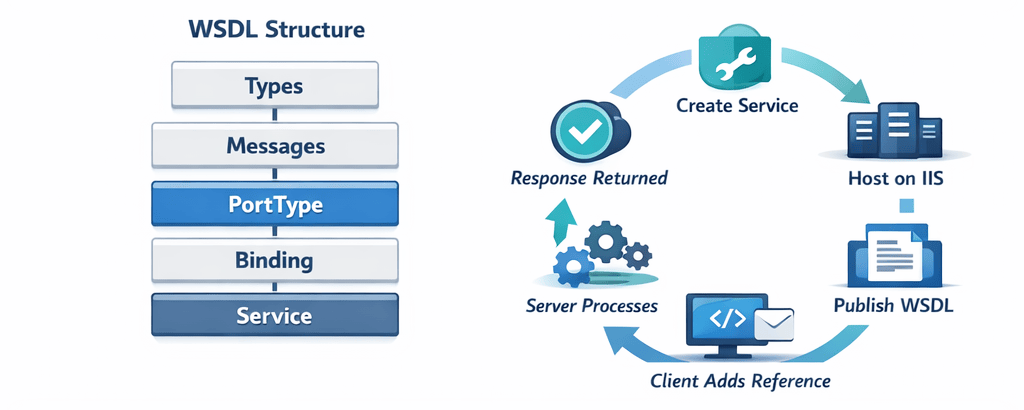
WSDL is an XML-based document that describes the web service methods, parameters, and communication format.
WSDL, or Web Services Description Language, acts as the formal contract between the service provider and service consumer. It specifies available operations, supported data types, request formats, response structures, and service endpoints so that client applications know exactly how to communicate with the web service.
Development tools such as Visual Studio automatically read the WSDL document and generate proxy classes. As a result, developers can call remote web service methods almost like local C# methods without manually constructing SOAP requests.
Whenever the service interface changes, developers should update client references so that newly generated proxy classes remain synchronized with the latest WSDL definition.
🌍 Hosting on IIS
- Open IIS Manager
- Add Application
- Set physical path
- Configure default document
Internet Information Services (IIS) is the recommended hosting platform for ASP.NET Web Services because it manages incoming requests, application pools, security settings, authentication, and application recycling automatically.
Before deploying to production, developers should verify application pool settings, .NET Framework version, file permissions, and firewall configuration. Proper deployment practices improve service availability and reduce runtime errors after publishing.
🔌 Consuming Web Service in C#
var client = new MyServiceSoapClient();
int result = client.AddNumbers(10, 20);
Visual Studio simplifies service consumption by generating strongly typed proxy classes from the WSDL document. Developers simply create an instance of the generated client class and invoke methods as though they were local objects.
In enterprise applications, client-side exception handling, timeout configuration, and proper disposal of service clients are important best practices. These measures improve reliability when communicating with remote services over unreliable networks.
🌐 Calling Web Service Using AJAX
$.ajax({
    type: "POST",
    url: "MyService.asmx/AddNumbers",
    data: JSON.stringify({ a: 5, b: 10 }),
    contentType: "application/json",
    success: function(response) {
        console.log(response.d);
    }
});
AJAX enables browser-based applications to communicate with ASP.NET Web Services asynchronously without refreshing the page. This improves user experience by allowing background communication with the server while users continue interacting with the application.
When exposing services for browser access, developers should validate user input carefully and implement appropriate authentication mechanisms to prevent unauthorized access to sensitive business operations.
📡 SOAP XML Example
<soap:Envelope>
  <soap:Body>
    <AddNumbers>
      <a>5</a>
      <b>10</b>
    </AddNumbers>
  </soap:Body>
</soap:Envelope>
Every SOAP request follows a structured XML format containing an envelope, header (when required), and body. This standardized message format allows different technologies to exchange information consistently regardless of their underlying programming language.
Although XML messages are larger than JSON payloads used by REST APIs, SOAP provides standardized messaging, security extensions, reliable communication, and transaction support that remain valuable in many enterprise environments.
❌ Limitations
- Heavy XML format
- Slower than REST APIs
- Outdated technology
The largest disadvantage of ASMX Web Services is the overhead introduced by XML serialization and SOAP messaging. Compared to lightweight REST APIs, SOAP requests generally consume more bandwidth and require additional processing time.
Another limitation is reduced flexibility for modern frontend frameworks and mobile applications, which typically prefer JSON-based communication. Consequently, many new cloud-native applications choose REST APIs or gRPC instead of SOAP services.
🚀 Modern Alternatives
- ASP.NET Web API
- REST APIs
- gRPC
Modern application development increasingly relies on ASP.NET Web API for RESTful services because it delivers lightweight JSON responses and integrates naturally with JavaScript frameworks, mobile apps, and cloud-native architectures.
For high-performance communication between internal microservices, many organizations now adopt gRPC because it offers efficient binary serialization and lower network overhead. Nevertheless, legacy enterprise systems continue using ASMX where long-established SOAP integrations remain critical.
This ASP.NET Web Services Tutorial helps beginners understand how SOAP-based services work in real-world applications.
Whether you are maintaining an existing enterprise application or preparing to migrate legacy systems to modern architectures, understanding ASP.NET Web Services provides valuable insight into distributed application design and enterprise system integration.
Conclusion and Next Step
ASP.NET Web Services (ASMX) are a foundational technology for distributed systems. While modern APIs have replaced them in many scenarios, they are still useful for legacy systems and understanding service-based architecture.
Developers who understand both legacy SOAP services and modern REST APIs are better prepared to maintain existing enterprise applications and plan successful migration strategies. This knowledge remains valuable because many organizations continue to integrate legacy systems with newer cloud-based platforms.
Understanding legacy web service technologies is crucial when maintaining or migrating enterprise systems. Learn modern and legacy communication patterns in our guide on Advanced .NET Development: Complete Guide for Enterprise Applications. Compare SOAP protocol overhead in SOAP vs REST API: Key Differences, and plan your migration using How to Create an ASP.NET Core Web API and REST API Best Practices.
📖 Official Microsoft Docs:
ASP.NET Web Services Documentation