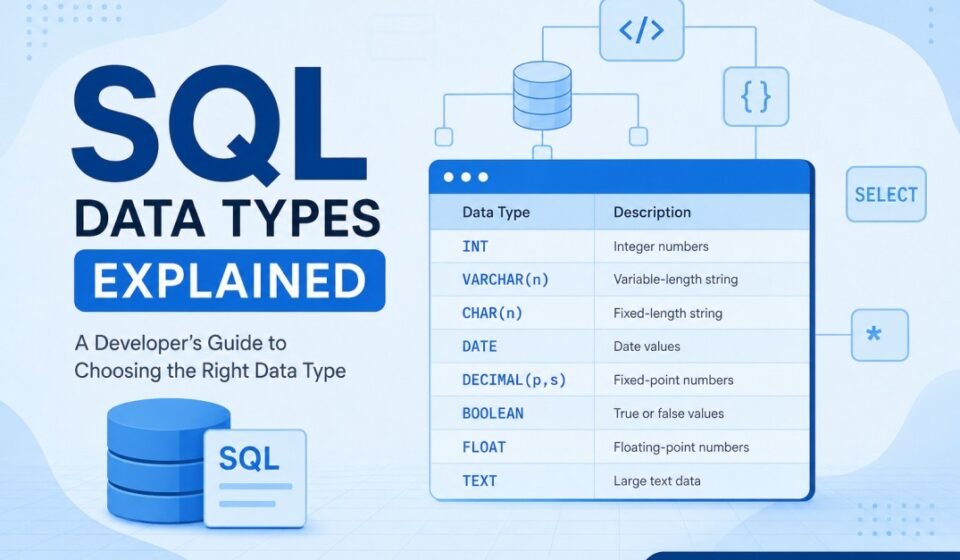

SQL Data Types Explained: Complete Guide for Developers and Beginners
Databases are the foundation of almost every modern application. Whether you build a social media platform, eCommerce website, SaaS application, banking system, or analytics dashboard, data storage becomes a critical part of software development.
When developers begin learning SQL, they usually focus on SELECT statements, filtering records, and table creation. However, one topic that significantly impacts application performance and database quality is SQL data types.
Many developers initially think SQL data types are only small syntax choices during table creation. In reality, they are architectural decisions. Data types affect storage size, validation rules, indexing behavior, query performance, scalability, and application reliability.
In this SQL data types explained guide, you will learn what SQL data types are, why they matter, how various categories work, practical examples, common mistakes, and optimization recommendations for developers.
What Are SQL Data Types?
SQL data types define the kind of information that can be stored inside a database column.
Every table contains columns, and every column requires a defined data type.
CREATE TABLE Users(
UserId INT,
Name VARCHAR(100),
DateOfBirth DATE
);
In this example:
- UserId stores numbers using INT
- Name stores text using VARCHAR
- DateOfBirth stores date values
Data types help SQL understand how data should be stored and processed.
Without defined types, databases would not know whether a value represents text, numbers, dates, or binary information.
Why SQL Data Types Matter
Many beginners underestimate how important data types are. Professional developers understand that selecting correct types creates faster and more efficient systems.
At first glance, choosing between INT, VARCHAR, DATE, or DECIMAL may appear like a small decision during table creation. However, data types influence nearly every aspect of a database system including storage allocation, query execution, indexing behavior, validation rules, and future scalability.
As applications grow and databases begin storing thousands or even millions of records, poor data type decisions can create serious performance bottlenecks. Even a small design mistake repeated across large tables may consume unnecessary storage and increase processing overhead.
Database design is not simply about storing data. It is also about storing data efficiently. Experienced software developers treat data type selection as an architectural decision rather than a simple syntax requirement.
Storage Optimization
Smaller data types require less storage space. Reducing storage improves memory efficiency and overall database performance.
For example, storing small values using BIGINT when INT would be sufficient wastes storage resources. In applications with millions of rows, these unnecessary allocations can significantly increase database size.
Efficient storage also improves backup speed, indexing performance, and query execution time.
Data Validation
Data types ensure invalid values do not enter databases.
A DATE column prevents random text values from being stored.
Suppose a database stores employee joining dates. If developers allow unrestricted text storage, users could accidentally enter invalid values such as “tomorrow” or random words. Using proper date types ensures consistency and prevents bad data from entering the system.
Strong validation improves data quality and reduces application errors.
Query Performance
Indexes and filtering operations become more efficient when columns use optimized types.
Databases continuously sort, search, and filter records. Using appropriate data types helps query engines process information faster.
For example, comparing integer values is generally faster than comparing large text values. Small optimizations become increasingly important in large enterprise systems.
Application Stability
Applications become more predictable and easier to maintain.
Consistent data structures make software behavior more reliable. Developers writing APIs, backend services, and reporting systems can confidently work with predictable formats.
Proper data types also reduce unexpected bugs and simplify future maintenance as applications evolve.
Main Categories of SQL Data Types
Most database systems classify SQL data types into several categories.
- Numeric Data Types
- Character Data Types
- Date and Time Types
- Boolean Types
- Binary Types
1. Numeric Data Types
Numeric data types store numbers and mathematical values.
Applications frequently use numbers for IDs, pricing, balances, counts, statistics, and measurements.
INT
INT stores whole numbers without decimal values.
EmployeeId INT
Examples:
- 1
- 100
- 5000
Common use cases:
- User IDs
- Order numbers
- Inventory counts
- Counters
Most applications heavily rely on integer values.
BIGINT
BIGINT stores very large integer values.
Applications with millions of records frequently use BIGINT to avoid overflow issues.
Large enterprise systems and analytics platforms often use BIGINT identifiers.
SMALLINT
SMALLINT stores smaller ranges of numbers while consuming less storage.
For example:
Rating SMALLINT
If ratings range only between 1 and 5, using BIGINT becomes unnecessary.
DECIMAL
DECIMAL stores exact numeric values.
Salary DECIMAL(10,2)
Meaning:
- 10 total digits
- 2 digits after decimal
DECIMAL is heavily used in financial systems because precision matters.
Examples:
- Bank balances
- Prices
- Invoices
- Tax calculations
FLOAT
FLOAT stores approximate decimal values.
Scientific calculations and measurements often use FLOAT.
Because FLOAT may introduce rounding differences, avoid using it for financial calculations.
2. Character and String Data Types
Character data types store textual information.
Applications commonly store names, addresses, comments, product titles, and user-generated content.
Choosing proper text types improves storage efficiency and indexing performance.
CHAR
CHAR stores fixed-length strings.
CountryCode CHAR(3)
Even if data contains fewer characters, SQL reserves complete space allocation.
Useful for:
- Country codes
- Status values
- Currency codes
VARCHAR
VARCHAR stores variable-length strings.
Name VARCHAR(100)
Unlike CHAR, it only stores required characters.
Most applications use VARCHAR extensively.
Examples:
- User names
- Email addresses
- Addresses
- Titles
For example:
Email VARCHAR(150)
This allows flexible text storage.
TEXT
TEXT stores large content values.
Modern applications frequently store long-form content.
Examples include:
- Blog posts
- User biographies
- Comments
- Documentation
ArticleContent TEXT
TEXT becomes useful when content length varies significantly.
3. Date and Time Data Types
Applications continuously process date and time information.
Every login event, transaction, order placement, and account creation typically records timestamps.
DATE
Stores calendar dates only.
JoiningDate DATE
Example:
2026-05-19
Used for birthdays, subscriptions, and scheduling.
TIME
Stores only time values.
StoreOpening TIME
Example:
09:30:00
DATETIME
Stores both date and time.
CreatedAt DATETIME
Examples include:
- Activity logs
- Orders
- Payments
- User registrations
TIMESTAMP
TIMESTAMP often supports automatic updates.
Useful for tracking modifications.
UpdatedAt TIMESTAMP
This allows systems to maintain history efficiently.
4. Boolean Data Types
Boolean values represent true or false conditions.
IsActive BOOLEAN
Examples:
- True
- False
- 1
- 0
Applications commonly use boolean values for account states and feature controls.
5. Binary Data Types
Binary types store raw binary information.
Examples include:
- Images
- Files
- Videos
- Documents
Examples include BLOB and VARBINARY.
Real World SQL Table Example
CREATE TABLE Customers(

CustomerId INT,

FullName VARCHAR(100),

Email VARCHAR(150),

BirthDate DATE,

AccountBalance DECIMAL(10,2),

IsPremium BOOLEAN,

CreatedAt DATETIME

);
This structure combines multiple data types and demonstrates practical SQL design principles.
Common Mistakes Developers Make
Using VARCHAR Everywhere
Many beginners store everything as text. This reduces performance and creates validation problems.
Ignoring Precision
Financial applications should use DECIMAL instead of FLOAT.
Using Oversized Types
Using BIGINT unnecessarily wastes storage.
Not Planning Future Growth
Applications grow over time. Future scalability matters.
Performance Tips
- Choose smallest practical types
- Avoid indexing large text fields
- Use VARCHAR carefully
- Use DECIMAL for financial values
- Think about future data growth
Helpful Resources
Official SQL Documentation:
Conclusion and Next Step
Understanding SQL data types is one of the most important database concepts developers must learn. Data types influence performance, validation, maintainability, and scalability.
Instead of treating data types as simple syntax choices, think of them as long-term architectural decisions.
By selecting appropriate types early, developers create cleaner databases and build faster applications.
Choosing appropriate data types optimizes table storage and speeds up index evaluation. Expand your database design skillset with our master SQL Server Tutorial: Complete Guide for Beginners to Advanced. Revisit database basics in What is SQL? A Beginner’s Complete Guide, validate column values using Understanding SQL Constraints, and establish entity integrity with Primary Key vs Foreign Key.