
SQL Operators Explained: Complete Guide for Developers
When developers begin working with databases, writing SELECT statements is usually the first step. However, retrieving every record from a database table is rarely useful in production systems. Applications need conditions, filtering logic, calculations, and data comparisons. This is where SQL operators become essential. Understanding SQL operators explained concepts helps developers write smarter queries and create efficient applications.
Whether you are building an eCommerce platform, dashboard system, analytics application, or backend API, operators help control how SQL evaluates data. They make query conditions readable and allow applications to retrieve only relevant information.
In practical development, SQL operators appear almost everywhere. User login systems compare credentials, reporting systems calculate totals, and search functionality combines conditions using logical operators. Learning them early creates a strong database foundation. Moreover, developers who understand operator behavior can troubleshoot incorrect results much faster.
What Are SQL Operators?
SQL operators are symbols or keywords used inside SQL statements to perform comparisons, calculations, or combine conditions. Operators tell the database engine how values should be evaluated. They commonly appear in WHERE clauses, JOIN conditions, calculated columns, HAVING clauses, and other query expressions.
Think of operators as decision-making tools. Instead of fetching every row from a table, operators define specific conditions that control returned results. Therefore, they are fundamental to filtering data and implementing business rules inside database queries.
SELECT *
FROM Employees
WHERE Salary > 50000;
The greater-than operator tells SQL to return employees whose salary exceeds fifty thousand. This simple example demonstrates the basic idea behind SQL operators explained throughout this guide: an operator connects values and determines how the database should evaluate them.
In enterprise applications, operators can also influence reporting accuracy and application behavior. For example, a payroll application may compare salaries, while an inventory application can compare available stock against reorder levels. Choosing the correct operator is therefore important for both correctness and maintainability.
Why SQL Operators Matter in Real Projects
Many beginners learn SQL syntax but do not understand where operators fit into actual applications. In production environments operators appear continuously. They help developers implement search filters, validate business conditions, calculate values, and restrict database results.
For example, an online store may use comparison operators to find products below a customer’s budget. Similarly, an analytics dashboard may combine multiple conditions with AND and OR. As a result, SQL operators are not just syntax features; they are practical tools for application logic and data processing.
Real examples:
- User authentication systems
- Product filtering features
- Dashboard analytics
- Transaction processing
- Search systems
- Business reports
Developers should also consider maintainability. A query with clear conditions is easier to test and troubleshoot than a query containing unnecessary or confusing expressions. Furthermore, well-designed conditions can reduce the amount of data transferred from the database to an application.
Types of SQL Operators
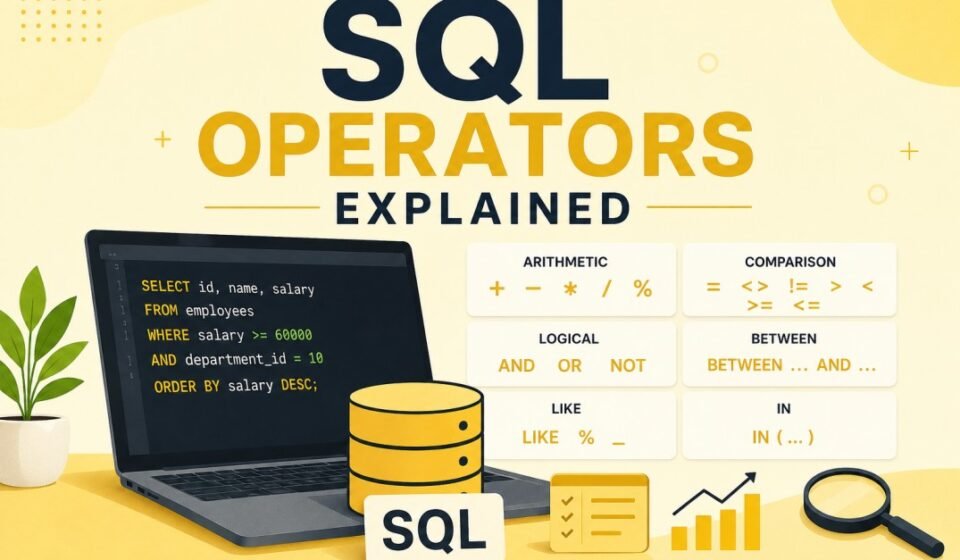
1. Arithmetic Operators
Arithmetic operators perform mathematical calculations. They are useful when a query needs to calculate totals, differences, percentages, quantities, or other numeric values without changing the stored data.
| Operator | Description |
|---|---|
| + | Addition |
| – | Subtraction |
| * | Multiplication |
| / | Division |
| % | Modulus |
For example, a reporting query can calculate a new price while leaving the original product price unchanged. This approach is useful when the calculated value is required only for presentation or reporting.
Example:
SELECT ProductName,
Price,
Price + 100 AS UpdatedPrice
FROM Products;
This query calculates a modified value during execution. Therefore, the database can return both the stored price and the calculated price in the same result set. Developers should remember that arithmetic involving NULL values may produce NULL results, so NULL handling should be considered in production queries.
Common use cases:
- Invoice systems
- Discount calculations
- Tax processing
- Revenue reporting
Arithmetic expressions are particularly useful in financial and reporting applications. However, developers should avoid unnecessarily complex calculations on very large result sets when the same result can be calculated more efficiently elsewhere.
2. Comparison Operators
Comparison operators compare two values. They are among the most frequently used SQL operators because applications constantly need to determine whether values are equal, greater, smaller, or different.
| Operator | Meaning |
|---|---|
| = | Equal |
| > | Greater Than |
| < | Less Than |
| >= | Greater Than Equal |
| <= | Less Than Equal |
| != | Not Equal |
SELECT *
FROM Orders
WHERE TotalAmount >=1000;
The query returns orders whose amount is greater than or equal to one thousand. Comparison operators are useful for dates, numbers, strings, and many other database values. For instance, an application can retrieve records created after a particular date or customers whose account status is different from a specified value.
One common mistake is misunderstanding NULL comparisons. A condition such as ColumnName = NULL does not behave as a normal equality comparison. Developers should use IS NULL or IS NOT NULL when checking for missing values.
3. Logical Operators
Logical operators combine or reverse conditions. They become especially important when a query contains multiple business rules. SQL operators such as AND, OR, and NOT allow developers to build more precise filtering logic.
| Operator | Description |
|---|---|
| AND | All conditions true |
| OR | One condition true |
| NOT | Reverse condition |
SELECT *
FROM Employees
WHERE Department='IT'
AND Salary >70000;
Both conditions must match. This means the result includes employees who belong to the IT department and have a salary greater than seventy thousand. Similarly, OR can broaden a search when any one of several conditions is acceptable.
When logical expressions become complex, parentheses should be used to make the intended behavior obvious. This improves readability and reduces the possibility of returning incorrect records because of operator precedence.
4. IN Operator
SELECT *
FROM Students
WHERE City IN ('Delhi','Mumbai','Pune');
IN simplifies multiple OR conditions and creates cleaner SQL. It is especially useful when an application needs to filter records against a known list of values. For example, a reporting system may retrieve transactions from several selected regions using one readable condition.
For maintainability, developers should avoid unnecessarily large hard-coded lists. In dynamic applications, parameterized queries or appropriate database structures are generally safer and easier to maintain.
5. BETWEEN Operator
SELECT *
FROM Products
WHERE Price BETWEEN 500 AND 2000;
Useful for ranges and filters. BETWEEN is commonly used with numeric values, dates, and other comparable data. Developers should remember that the boundaries are included, so this example can return products priced at both 500 and 2000.
Range conditions are common in reports, search screens, and administrative dashboards. When working with dates, however, developers should carefully consider time portions so that the complete intended period is included.
6. LIKE Operator
SELECT *
FROM Customers
WHERE Name LIKE 'A%';
The percentage symbol acts as a wildcard. In this example, the database searches for names beginning with the letter A. LIKE is useful for basic text searching, although developers should consider indexing and database-specific search features when working with large datasets.
A leading wildcard, such as %abc, can make efficient index usage more difficult. Therefore, search requirements should be reviewed carefully before using LIKE across large production tables.
SQL Operators Inside WHERE Clause
SELECT *
FROM Users
WHERE Age >18
AND Country='India';
The database evaluates both conditions before returning data. The WHERE clause is one of the most important places to apply SQL operators because it limits the rows returned by a query.
Using precise conditions can improve application performance because fewer unnecessary rows need to be processed and transferred. However, filtering alone does not guarantee fast execution. Index design, statistics, data distribution, query structure, and execution plans also influence performance.
In application development, parameterized queries should be used instead of directly concatenating user input into SQL statements. This approach improves security and helps protect applications from SQL injection attacks while keeping filtering logic predictable.
Operator Precedence in SQL
SELECT *
FROM Employees
WHERE Salary >40000
OR Department='HR'
AND Experience >5;
SQL follows precedence rules. AND usually executes before OR. Therefore, the database does not simply evaluate every condition from left to right. Understanding precedence is an important part of using SQL operators correctly, especially when a query contains several logical expressions.
Use parentheses for clarity:
SELECT *
FROM Employees
WHERE
(Salary >40000 OR Department='HR')
AND Experience >5;
The second query explicitly groups the salary and department conditions before applying the experience requirement. This makes the business rule easier to understand and prevents accidental changes in meaning when a query is modified later.
Performance Best Practices
- Avoid unnecessary conditions
- Use indexes
- Prefer IN over repeated OR
- Avoid leading wildcard searches
- Review execution plans
Good query performance requires more than simply knowing SQL operators. Developers should understand how the database optimizer evaluates expressions and how indexes support filtering. An indexed column can often make selective conditions much faster, although an index is not automatically beneficial for every query.
Furthermore, avoid applying functions or calculations unnecessarily to indexed columns when doing so prevents efficient index usage. Always test important queries with realistic production-sized data. Execution plans can reveal scans, expensive operators, poor estimates, and other performance problems.
For enterprise systems, performance testing should also consider concurrency. A query that appears fast with one user may behave differently when hundreds of requests execute simultaneously. Therefore, database design, indexing strategy, parameterization, and careful use of SQL operators should be considered together.
Official SQL Resource
Consulting reliable technical documentation is useful when database behavior differs between SQL implementations. Although many SQL concepts are standardized, database platforms can have differences in supported syntax, functions, optimization behavior, and data types. Developers should therefore verify platform-specific behavior before deploying important queries.
Conclusion and Next Step
This SQL operators explained guide covered operator categories developers use daily. Understanding comparison operators, logical conditions, filtering, arithmetic calculations, and pattern matching helps developers write efficient SQL queries and build stronger applications.
The key to mastering SQL operators is practical usage. Start with simple conditions, then combine operators as application requirements become more complex. Additionally, test queries with realistic data and review their execution plans before using them in high-traffic production systems.
Logical, comparison, and arithmetic operators dictate how precisely your database queries execute. To master database operations, explore our complete SQL Server Tutorial: Complete Guide for Beginners to Advanced. Learn to apply these operators in WHERE Clause in SQL Explained, project clean output columns using SELECT Statement Explained, and enforce business rules via Understanding SQL Constraints.
Finally, keep practicing SQL operators with real-world filtering, reporting, and data validation scenarios. A strong understanding of these fundamentals will make advanced SQL topics such as joins, subqueries, aggregation, transactions, and query optimization much easier to learn and apply.