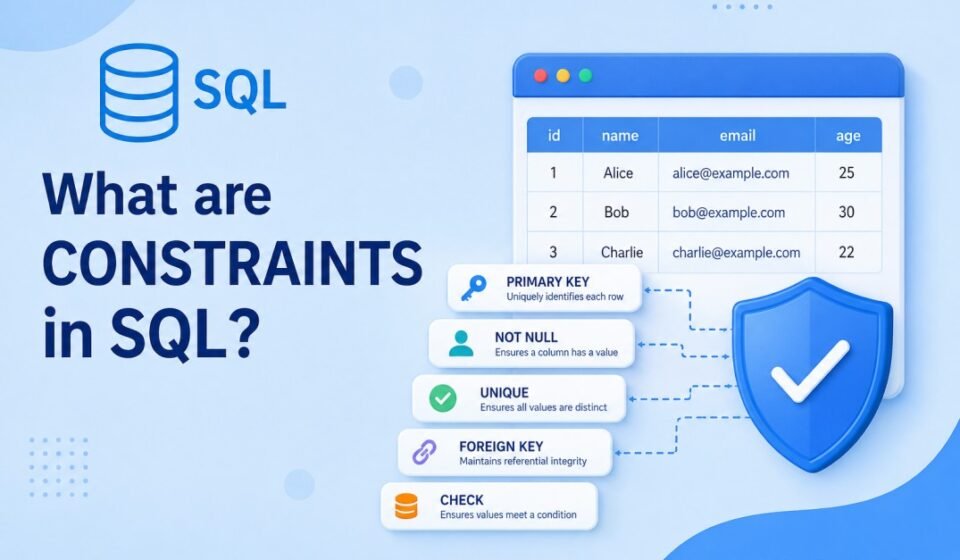

What Are Constraints in SQL? Complete Guide for Developers
When developers begin learning SQL, they usually focus on creating tables, inserting records, and writing queries. However, one of the most important concepts in database design is understanding SQL constraints. These rules define what kind of data can be stored inside database tables.
Without proper rules, a database can quickly become difficult to manage. Duplicate values, missing information, invalid records, and inconsistent relationships can create major application issues. Therefore, SQL constraints help solve these problems by enforcing rules directly at the database level.
Whether you are building ecommerce systems, banking applications, dashboards, CRM platforms, or SaaS products, constraints help ensure databases remain accurate and reliable.
SQL Overview Before Understanding Constraints
SQL stands for Structured Query Language. It is the standard language used for managing relational databases. Developers use SQL to create tables, insert records, retrieve information, update data, and delete records.
Inside a relational database, information is stored in rows and columns. Moreover, each column stores a particular type of data such as usernames, employee IDs, email addresses, or product prices.
SQL constraints are attached to these columns and tables to control what values users can insert.
For example:
- Email should be unique
- User ID cannot be empty
- Age cannot be negative
- Orders should reference valid customers
As a result, these rules are enforced through SQL constraints.
Why SQL Constraints Matter in Database Systems
Many developers initially perform validation inside application code. However, frontend and backend validation are not always enough because applications are not the only source of database updates.
Additionally, data can enter systems through multiple channels:
- API integrations
- Admin panels
- Database migration scripts
- Third-party tools
- Bulk imports
- Direct database access
Therefore, SQL constraints provide centralized protection regardless of where the data originates.
Benefits of Using SQL Constraints
- Improve data integrity
- Prevent duplicate records
- Reduce invalid values
- Maintain relationships between tables
- Reduce debugging efforts
- Improve long-term reliability
- Support production-ready database design
As a result, professional systems rely heavily on constraints because data quality directly affects application quality.
Types of SQL Constraints Explained
SQL supports several constraint types. Furthermore, each type serves a unique purpose and solves specific database problems.
1. SQL NOT NULL Constraint
The NOT NULL constraint prevents a column from storing empty values.
For example, every registered user may be required to provide an email address. Otherwise, missing information can create incomplete records.
CREATE TABLE Users(
UserID INT,
Email VARCHAR(100) NOT NULL
);
As a result, SQL refuses inserts where Email is missing.
2. SQL UNIQUE Constraint
The UNIQUE constraint ensures values remain different across rows.
Common use cases include:
- Email addresses
- Usernames
- Order IDs
- Employee numbers
CREATE TABLE Users(
Email VARCHAR(100) UNIQUE
);
Therefore, inserting duplicate email values generates an error.
3. SQL PRIMARY KEY Constraint
The PRIMARY KEY constraint uniquely identifies every row inside a table.
Primary keys automatically include:
- NOT NULL behavior
- UNIQUE behavior
CREATE TABLE Employees(
EmployeeID INT PRIMARY KEY,
Name VARCHAR(100)
);
Consequently, every employee receives a unique identifier.
Moreover, primary keys are essential because databases require reliable ways to identify individual records.
4. SQL FOREIGN KEY Constraint
Relational databases connect tables through relationships. Therefore, the FOREIGN KEY constraint maintains those relationships and prevents invalid references.
CREATE TABLE Orders(
OrderID INT,
CustomerID INT,
FOREIGN KEY(CustomerID)
REFERENCES Customers(CustomerID)
);
The database now ensures CustomerID exists in the Customers table.
If a customer record does not exist, SQL blocks insertion.
5. SQL CHECK Constraint
The CHECK constraint validates values using conditions.
For instance, application users may need to be older than 18 years.
CREATE TABLE Users(
Age INT CHECK(Age>=18)
);
Consequently, invalid values automatically fail validation.
6. SQL DEFAULT Constraint
The DEFAULT constraint inserts predefined values whenever users do not supply information.
CREATE TABLE Users(
Country VARCHAR(50)
DEFAULT 'India'
);
Therefore, SQL automatically stores India if no country value is entered.
Real-World Example of SQL Constraints
Imagine building a social media application.
The Users table may require:
- UserID as PRIMARY KEY
- Email as UNIQUE
- Password as NOT NULL
- Country using DEFAULT value
- Age using CHECK validation
CREATE TABLE Users(
UserID INT PRIMARY KEY,
Email VARCHAR(100) UNIQUE,
Password VARCHAR(255) NOT NULL,
Country VARCHAR(50) DEFAULT 'India',
Age INT CHECK(Age>13)
);
As a result, this structure automatically protects the database against invalid information.
Adding SQL Constraints to Existing Tables
Developers frequently add rules after initial table creation. Therefore, SQL supports this process through ALTER TABLE.
ALTER TABLE Employees
ADD CONSTRAINT Unique_Email
UNIQUE(Email);
This approach is commonly used during production migrations.
Removing SQL Constraints
Requirements change over time. Therefore, SQL allows developers to remove constraints whenever needed.
ALTER TABLE Employees
DROP CONSTRAINT Unique_Email;
However, removing rules carelessly can introduce serious data quality issues.
SQL Constraints Performance Considerations
Many developers ask whether constraints affect performance.
Constraints perform additional validation during insert and update operations. Consequently, this introduces a small processing cost.
However, the advantages usually outweigh the overhead.
- Cleaner datasets
- Reduced bugs
- Faster debugging
- Improved consistency
- Fewer production issues
Therefore, enterprise applications often treat constraints as mandatory rather than optional.
Common SQL Constraints Mistakes Developers Make
Using Application Validation Only
Many developers rely entirely on frontend validation. However, database constraints should always provide an additional protection layer.
Ignoring Foreign Keys
Without proper relationships, databases frequently contain orphan records and inconsistent information.
Using Too Few Constraints
Meanwhile, minimal validation creates opportunities for invalid data to enter systems.
Best Practices for SQL Constraints
- Always create primary keys
- Use foreign keys where relationships exist
- Add NOT NULL for required data
- Use CHECK for business rules
- Name constraints properly
- Document database structures
Official Resource
Conclusion and Next step
Understanding what constraints in SQL are is essential for software developers. Constraints protect data quality, enforce rules, maintain relationships, and reduce application-level issues.
As databases become larger and applications grow more complex, SQL constraints become increasingly important. Therefore, learning them early helps developers create scalable and production-ready systems.
Database constraints protect transactional systems from bad or duplicate data entries. Build a reliable relational database foundation by following our step-by-step SQL Server Tutorial: Complete Guide for Beginners to Advanced. Dive deeper into relationships with Primary Key vs Foreign Key, eliminate redundancy via SQL Normalization Explained, and structure clean schemas following Database Design Best Practices.