
SQL JOIN Explained: INNER JOIN vs LEFT JOIN vs RIGHT JOIN with Examples
SQL JOIN is one of the most important concepts in relational databases. As applications grow, data is often stored across multiple tables rather than a single table. To retrieve meaningful information, developers need a way to combine related data from different tables.
This is where SQL JOIN comes into play. Whether you are working with SQL Server, MySQL, PostgreSQL, or Oracle, JOIN operations are used daily in real-world applications.
In this guide, you will learn how SQL JOIN works, the differences between INNER JOIN, LEFT JOIN, and RIGHT JOIN, and when to use each one.
What is SQL JOIN?
A SQL JOIN combines rows from two or more tables based on a related column between them.
For example, imagine an e-commerce application:
- Customers table stores customer information.
- Orders table stores order details.
To find which customer placed which order, you must combine data from both tables using a JOIN.
Customers Table
| CustomerID | Name |
|---|---|
| 1 | John |
| 2 | Sarah |
| 3 | Mike |
Orders Table
| OrderID | CustomerID |
|---|---|
| 101 | 1 |
| 102 | 2 |
| 103 | 4 |
Notice that CustomerID 4 exists in Orders but not in Customers. This difference helps us understand how various JOIN types behave.
Understanding INNER JOIN
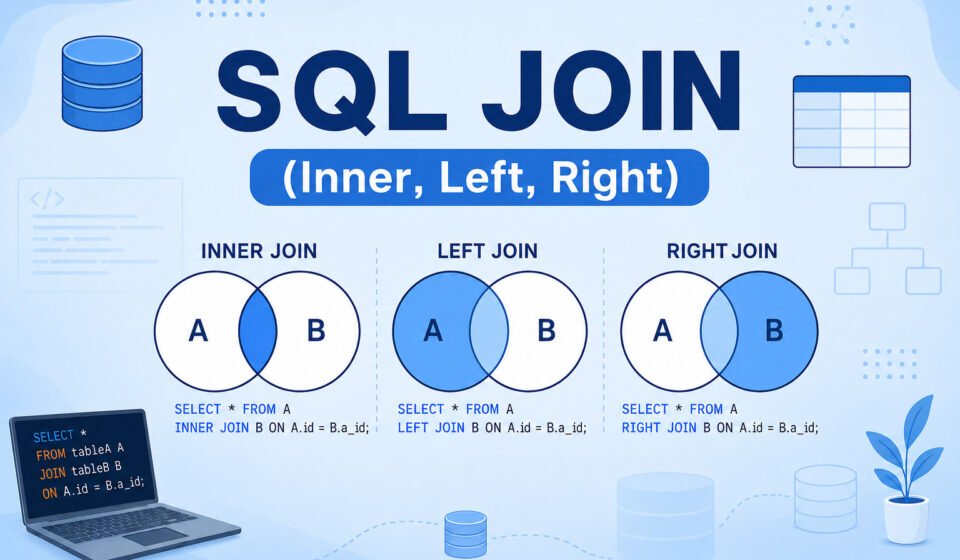
INNER JOIN returns only the rows that have matching values in both tables.
INNER JOIN Syntax
SELECT
    c.CustomerID,
    c.Name,
    o.OrderID
FROM Customers c
INNER JOIN Orders o
ON c.CustomerID = o.CustomerID;
Result
| CustomerID | Name | OrderID |
|---|---|---|
| 1 | John | 101 |
| 2 | Sarah | 102 |
Mike does not appear because he has no matching order. Similarly, OrderID 103 does not appear because CustomerID 4 does not exist in the Customers table.
When to Use INNER JOIN
- Displaying customers with orders.
- Showing employees assigned to projects.
- Retrieving matching records between tables.
- Generating reports with complete relationships.
INNER JOIN is the most commonly used JOIN because it returns only valid matching records.
Understanding LEFT JOIN
LEFT JOIN returns all records from the left table and matching records from the right table.
If no match exists, NULL values are returned for columns from the right table.
LEFT JOIN Syntax
SELECT
    c.CustomerID,
    c.Name,
    o.OrderID
FROM Customers c
LEFT JOIN Orders o
ON c.CustomerID = o.CustomerID;
Result
| CustomerID | Name | OrderID |
|---|---|---|
| 1 | John | 101 |
| 2 | Sarah | 102 |
| 3 | Mike | NULL |
Mike appears even though he has no orders because LEFT JOIN keeps all rows from the left table.
When to Use LEFT JOIN
- Finding customers who never placed orders.
- Listing employees without projects.
- Displaying all products, including unsold products.
- Auditing missing relationships in databases.
Finding Missing Records
SELECT c.*
FROM Customers c
LEFT JOIN Orders o
ON c.CustomerID = o.CustomerID
WHERE o.OrderID IS NULL;
This query returns customers who have never placed an order.
Understanding RIGHT JOIN
RIGHT JOIN works opposite to LEFT JOIN. It returns all rows from the right table and matching rows from the left table.
RIGHT JOIN Syntax
SELECT
    c.CustomerID,
    c.Name,
    o.OrderID
FROM Customers c
RIGHT JOIN Orders o
ON c.CustomerID = o.CustomerID;
Result
| CustomerID | Name | OrderID |
|---|---|---|
| 1 | John | 101 |
| 2 | Sarah | 102 |
| NULL | NULL | 103 |
OrderID 103 appears because RIGHT JOIN keeps all rows from the Orders table even when no matching customer exists.
When to Use RIGHT JOIN
- Displaying all orders regardless of customer records.
- Data migration verification.
- Database integrity checks.
- Auditing orphaned records.
INNER JOIN vs LEFT JOIN vs RIGHT JOIN
| Feature | INNER JOIN | LEFT JOIN | RIGHT JOIN |
|---|---|---|---|
| Matching Records | Yes | Yes | Yes |
| Keep Left Table Rows | No | Yes | No |
| Keep Right Table Rows | No | No | Yes |
| NULL Values Possible | No | Yes | Yes |
Performance Tips for SQL JOIN
1. Index Join Columns
Indexes improve JOIN performance significantly. Ensure foreign keys and frequently joined columns are indexed.
2. Select Only Required Columns
Avoid using SELECT *. Retrieve only necessary fields to reduce memory and network usage.
3. Filter Data Early
Use WHERE clauses to reduce the number of rows processed during JOIN operations.
4. Review Execution Plans
Database execution plans help identify slow JOIN operations and missing indexes.
Real-World Example
Imagine a learning management system.
- Students table stores student details.
- Courses table stores course information.
- Enrollments table stores registrations.
Using JOINs, developers can generate reports such as:
- Students enrolled in courses.
- Courses with no students.
- Students who never enrolled.
Without JOIN operations, retrieving this information would require multiple queries and complex application logic.
Official SQL Reference
For additional SQL documentation and standards, refer to:
SQL JOIN Reference
Conclusion And Next Step
SQL JOIN is a fundamental database concept every software developer should master. INNER JOIN retrieves only matching records, LEFT JOIN keeps all records from the left table, and RIGHT JOIN keeps all records from the right table.
Understanding these JOIN types enables you to build efficient queries, generate accurate reports, and work effectively with relational databases. Once you become comfortable with JOIN operations, handling complex database relationships becomes much easier.
Combining data from multiple tables is at the heart of relational database management. Build your complete querying skillset with our step-by-step SQL Server Tutorial: Complete Guide for Beginners to Advanced. Revisit basic data retrieval in SELECT Statement Explained, filter joined results cleanly using WHERE Clause in SQL Explained, and save complex JOIN logic as virtual tables using