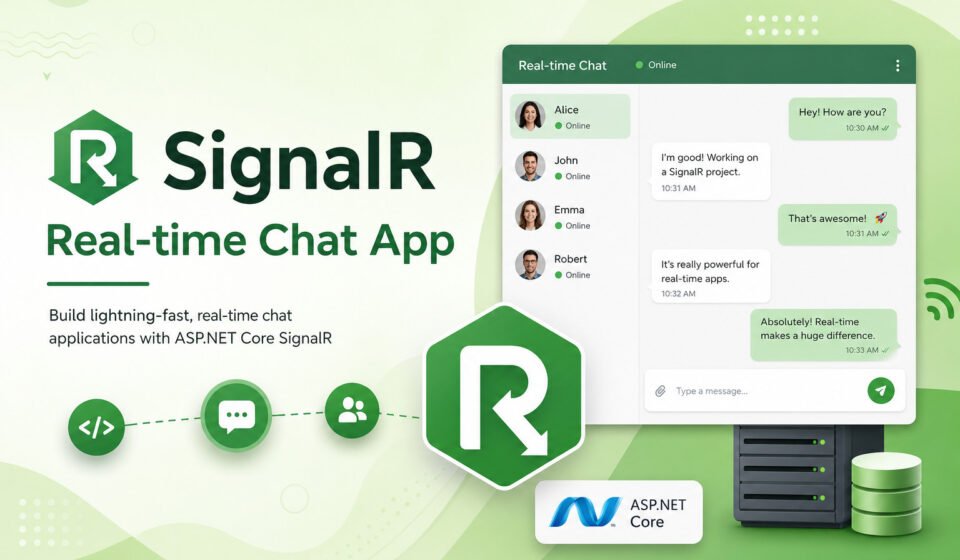
How to Build a SignalR Real-Time Chat App in ASP.NET Core: Complete Developer Guide

How to Build a SignalR Real-Time Chat App in ASP.NET Core: Complete Developer Guide
Real-time communication has become a standard requirement for modern web applications.
Users expect instant updates without refreshing the page, whether they are using chat
applications, collaboration platforms, notification systems, dashboards, or live tracking solutions.
ASP.NET Core SignalR makes it easy to build real-time applications that provide seamless user experiences.
In this guide, you will learn how to create a SignalR real-time chat app using ASP.NET Core,
understand SignalR architecture, implement hubs, connect clients, broadcast messages,
and explore best practices for production-ready applications.
What is SignalR?
SignalR is a real-time communication framework developed by Microsoft. It enables
server-side code to push content to connected clients instantly without requiring
clients to continuously poll the server.
SignalR automatically selects the best available transport mechanism, including:
- WebSockets
- Server-Sent Events (SSE)
- Long Polling
This abstraction allows developers to focus on application logic instead of managing
low-level communication protocols.
Why Use SignalR for Real-Time Applications?
Traditional web applications rely on request-response communication. The browser sends
a request and waits for the server response. This model works well for many scenarios,
but it becomes inefficient when instant updates are required.
SignalR solves this challenge by maintaining a persistent connection between the client
and server whenever possible.
Key Benefits
- Real-time message delivery
- Automatic connection management
- Cross-platform support
- Scalable architecture
- Simple API for developers
- WebSocket optimization
- Strong ASP.NET Core integration
Real-World Use Cases
SignalR is widely used across multiple industries and application types.
- Chat applications
- Live customer support systems
- Collaborative document editing
- Real-time dashboards
- Online gaming platforms
- Stock market monitoring
- IoT monitoring solutions
- Notification systems
Prerequisites
Before building a SignalR real-time chat app, ensure you have:
- .NET 8 SDK
- Visual Studio 2022 or VS Code
- Basic ASP.NET Core knowledge
- JavaScript fundamentals
Creating the ASP.NET Core Project
Start by creating a new ASP.NET Core Web Application.
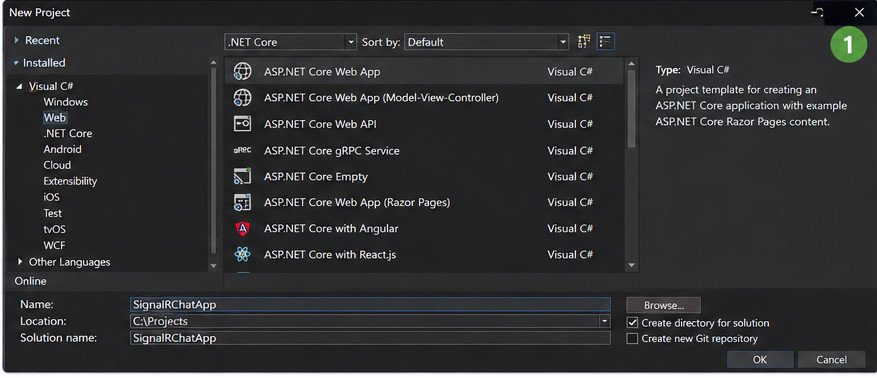
Figure 1: Creating a new ASP.NET Core Web Application project in Visual Studio.
dotnet new webapp -n SignalRChatApp
cd SignalRChatApp
SignalR is already included in modern ASP.NET Core projects, making setup straightforward.
Understanding SignalR Hubs
A Hub acts as the central communication endpoint between the server and connected clients.
Clients invoke methods on the hub, and the hub can send messages back to all clients,
specific users, or selected groups.
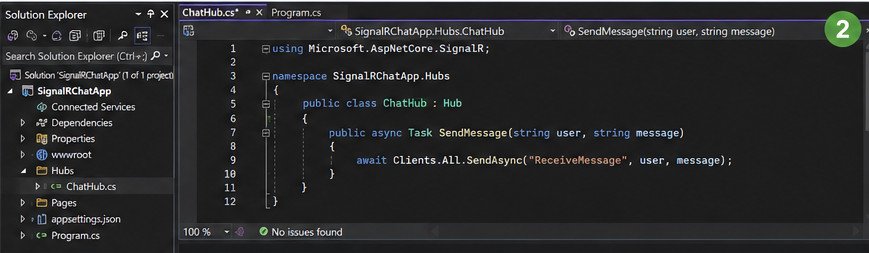
Figure 2: ChatHub.cs implementation used for broadcasting real-time messages.
Create a ChatHub class:
using Microsoft.AspNetCore.SignalR;

public class ChatHub : Hub
{
    public async Task SendMessage(string user, string message)
    {
        await Clients.All.SendAsync("ReceiveMessage", user, message);
    }
}
The SendMessage method broadcasts messages to every connected client.
Configuring SignalR in ASP.NET Core
Register SignalR services in Program.cs:
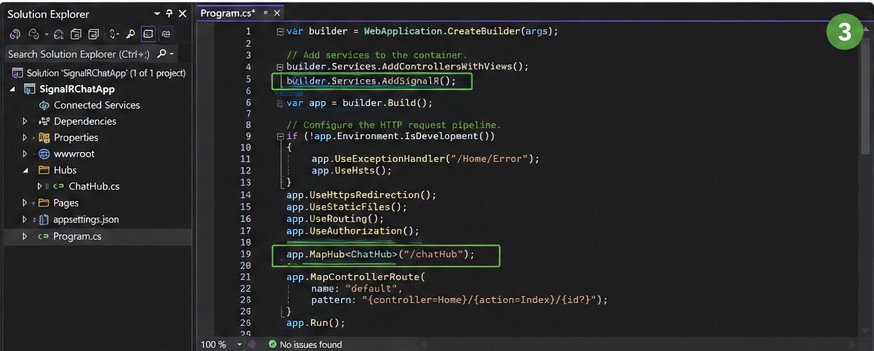
Figure 3: Registering SignalR services and mapping the ChatHub endpoint.
builder.Services.AddSignalR();
Map the hub endpoint:
app.MapHub<ChatHub>("/chatHub");
This endpoint will be used by client applications to establish real-time communication.
Building the Chat Interface
Create a simple chat user interface containing:
- User input field
- Message input field
- Send button
- Messages container
The interface should remain clean and responsive for a better user experience.
Connecting the Client to SignalR
Add the SignalR JavaScript client library to your application.
const connection = new signalR.HubConnectionBuilder()
    .withUrl("/chatHub")
    .build();
Start the connection:
connection.start()
    .then(() => console.log("Connected"))
    .catch(err => console.error(err));
Once connected, the client can send and receive messages in real time.
Receiving Messages from the Server
Register a client-side handler to process incoming messages:
connection.on("ReceiveMessage", (user, message) => {
    console.log(user + ": " + message);
});
Whenever the server broadcasts a message, all connected clients instantly receive it.
Sending Messages to the Hub
Use the invoke method to call server-side hub functions:
connection.invoke("SendMessage", user, message);
This allows the client to communicate directly with the SignalR hub.
Working with SignalR Groups
Groups are one of the most powerful SignalR features.
They enable targeted communication between subsets of users.
Examples include:
- Private chat rooms
- Team collaboration channels
- Department notifications
- Game lobbies
Adding a user to a group:
await Groups.AddToGroupAsync(Context.ConnectionId, "Developers");
Sending messages to a group:
await Clients.Group("Developers")
    .SendAsync("ReceiveMessage", user, message);
User-Specific Messaging
Sometimes you need to send messages to a specific user rather than broadcasting.
SignalR provides built-in support for user targeting.
await Clients.User(userId)
    .SendAsync("ReceiveNotification", message);
This capability is useful for alerts, notifications, and private messaging systems.
Handling Connection Events
SignalR provides lifecycle methods that help track user connectivity.
public override async Task OnConnectedAsync()
{
    await base.OnConnectedAsync();
}
public override async Task OnDisconnectedAsync(Exception exception)
{
    await base.OnDisconnectedAsync(exception);
}
These events can be used for presence indicators and online user tracking.
Security Best Practices
Security should always be considered when building real-time applications.
Recommended Practices
- Use HTTPS everywhere
- Implement authentication
- Use authorization policies
- Validate incoming data
- Limit message size
- Protect sensitive information
- Monitor connection activity
Authentication integration with ASP.NET Core Identity allows secure user communication.
Performance Optimization
As your application grows, performance becomes increasingly important.
Optimization Tips
- Use WebSockets whenever possible
- Minimize payload sizes
- Implement message throttling
- Compress large responses
- Scale using Azure SignalR Service
- Reduce unnecessary broadcasts
Efficient architecture helps maintain responsiveness under heavy traffic.
Scaling SignalR Applications
Single-server deployments work well initially, but larger applications often require
multiple server instances.
Azure SignalR Service simplifies horizontal scaling by managing client connections
and message distribution.
Learn more from Microsoft’s official documentation:
ASP.NET Core SignalR Documentation
Common Challenges and Solutions
Developers frequently encounter issues when building real-time applications.
Understanding these challenges early can save significant debugging time.
- Connection interruptions
- Authentication failures
- Cross-origin restrictions
- Message duplication
- Scalability bottlenecks
- Network latency
Implementing reconnect strategies and robust error handling significantly improves reliability.
Download Source Code
Download the complete SignalR Real-Time Chat App source code used in this tutorial.
The package includes:
- SignalRChatApp.sln
- SignalRChatApp.csproj
- Program.cs
- ChatHub.cs
- appsettings.json
- launchSettings.json
- README.md
Conclusion and Next Step
Building a SignalR real-time chat app in ASP.NET Core is one of the best ways to add
live communication capabilities to modern web applications. SignalR provides a clean
programming model, automatic transport selection, group management, user targeting,
and excellent integration with the ASP.NET Core ecosystem.
Whether you are creating chat systems, collaborative platforms, dashboards, or
notification services, SignalR offers a scalable and developer-friendly solution.
By following the architecture, security, and performance recommendations discussed in
this guide, you can build production-ready real-time applications that deliver
instant communication and a superior user experience.
Real-time bidirectional communication opens up powerful capabilities for modern enterprise applications. Discover advanced backend patterns in our master post on Advanced .NET Development: Complete Guide for Enterprise Applications. Integrate real-time hubs into your API using How to Create an ASP.NET Core Web API, handle async socket processing via Background Services in .NET, and secure your WebSockets using JWT Authentication in ASP.NET Core.