
Repository Pattern in .NET: Complete Developer Guide
Repository Pattern in .NET is a popular architectural pattern used to separate application or business logic from data-access code. Instead of allowing controllers and services to communicate directly with Entity Framework Core, ADO.NET, or another persistence technology, the repository provides a focused abstraction for reading and writing data. This separation can make a .NET application easier to test, maintain, and change when the data-access implementation evolves. However, the Repository Pattern is not automatically the right choice for every project. Modern .NET applications, especially those using Entity Framework Core, already receive powerful data-access abstractions through DbContext and DbSet. The real value of a repository comes when it creates a meaningful boundary around domain-specific data operations rather than simply wrapping every EF Core method. In this guide, you will learn what the Repository Pattern is, how it works, how to implement it in a practical ASP.NET Core application, how to register it with Dependency Injection, and when you should or should not use it.
What Is the Repository Pattern in .NET?
The Repository Pattern is a structural design pattern that provides an abstraction over data access. The application works with a repository interface instead of knowing how data is stored or retrieved. The repository may use Entity Framework Core, Dapper, ADO.NET, a Web API, or another persistence mechanism internally.
For example, a product service should normally focus on product-related business rules. It should not need to know whether products are loaded with Entity Framework Core or a SQL query. An IProductRepository can expose operations such as GetByIdAsync, GetAllAsync, AddAsync, UpdateAsync, and DeleteAsync. ProductRepository then implements those operations using the selected data-access technology.
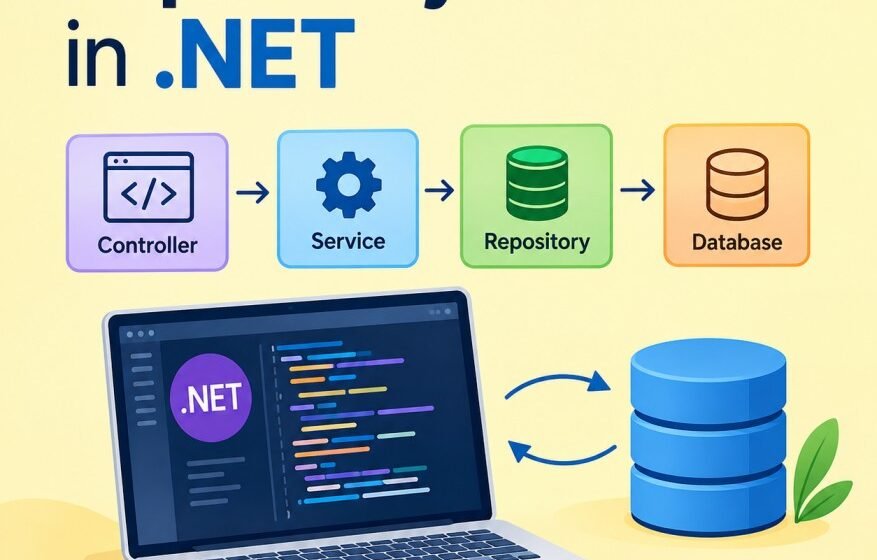
This separation creates a clear flow: Controller → Service → Repository → Database. The controller handles HTTP concerns, the service handles business logic, the repository handles persistence, and the database stores the data.
Why Use the Repository Pattern?
The primary reason to use a repository is separation of concerns. Without an abstraction, business services can become tightly coupled to database APIs and persistence details. Over time, this makes testing and maintenance harder.
A repository can also make unit testing easier. A service can depend on IProductRepository, while a test can provide a mock or fake implementation. The test does not need a real SQL Server database for every business-rule test.
Another benefit is that data-access logic has a defined location. Query construction, includes, filtering, tracking decisions, and persistence operations can remain inside the repository instead of being repeated across controllers and services.
However, abstraction has a cost. If a repository simply exposes methods such as Add, Remove, Find, and SaveChanges without adding meaningful behavior, it may become a thin wrapper around DbSet. In that situation, the abstraction can add files and complexity without providing much architectural value.
Repository Pattern Architecture
A typical implementation contains four main layers.
- Model or Entity: Represents application data, such as Product.
- Repository Interface: Defines the data operations required by the application.
- Repository Implementation: Contains the actual database-access code.
- Service or Controller: Uses the repository without knowing its implementation.
This structure works particularly well with Dependency Injection. ASP.NET Core can create the repository and inject it into a service or controller at runtime. Developers working with ASP.NET Core should also understand Dependency Injection because repository implementations are normally registered as scoped services. If you want to review DI concepts first, see the Dependency Injection in ASP.NET Core guide.
Example: Product Repository in ASP.NET Core
Consider a simple Product entity.
public class Product
{
    public int Id { get; set; }
    public string Name { get; set; } = string.Empty;
    public decimal Price { get; set; }
}
The repository interface defines only the operations required by the application.
public interface IProductRepository
{
    Task<List<Product>> GetAllAsync();
    Task<Product?> GetByIdAsync(int id);
    Task AddAsync(Product product);
    Task UpdateAsync(Product product);
    Task DeleteAsync(int id);
}
The interface is intentionally independent of Entity Framework Core. A service can use it without knowing which database technology is behind it.
Implementing the Repository with Entity Framework Core
The implementation can use an application DbContext.
public class ProductRepository : IProductRepository
{
    private readonly AppDbContext _context;

    public ProductRepository(AppDbContext context)
    {
        _context = context;
    }

    public async Task<List<Product>> GetAllAsync()
    {
        return await _context.Products
            .AsNoTracking()
            .ToListAsync();
    }

    public async Task<Product?> GetByIdAsync(int id)
    {
        return await _context.Products
            .FirstOrDefaultAsync(x => x.Id == id);
    }

    public async Task AddAsync(Product product)
    {
        await _context.Products.AddAsync(product);
        await _context.SaveChangesAsync();
    }

    public async Task UpdateAsync(Product product)
    {
        _context.Products.Update(product);
        await _context.SaveChangesAsync();
    }

    public async Task DeleteAsync(int id)
    {
        var product = await _context.Products.FindAsync(id);

        if (product != null)
        {
            _context.Products.Remove(product);
            await _context.SaveChangesAsync();
        }
    }
}
AsNoTracking is useful for read-only queries because EF Core does not need to track returned entities. This can reduce tracking overhead when the objects will not be modified. For database integration fundamentals, you can also read the Stack Engineering Hub guide on Connecting SQL with ASP.NET Core.
Registering the Repository with Dependency Injection
In a modern ASP.NET Core application, register the repository in Program.cs.
builder.Services.AddScoped<IProductRepository, ProductRepository>();The scoped lifetime is commonly appropriate for repositories that depend on Entity Framework Core DbContext because DbContext is normally scoped to an HTTP request. The repository then participates in the same dependency-injection scope.
A service can now receive the interface through constructor injection.
public class ProductService
{
    private readonly IProductRepository _repository;

    public ProductService(IProductRepository repository)
    {
        _repository = repository;
    }

    public async Task<List<Product>> GetProductsAsync()
    {
        return await _repository.GetAllAsync();
    }
}
The service does not create ProductRepository with new. This reduces coupling and makes the service easier to test. For more details about constructor injection and service lifetimes, see the Dependency Injection in ASP.NET Core guide.
Using the Repository from a Controller
The controller can depend on the service rather than directly accessing the database.
[ApiController]
[Route("api/[controller]")]
public class ProductsController : ControllerBase
{
    private readonly ProductService _service;

    public ProductsController(ProductService service)
    {
        _service = service;
    }

    [HttpGet]
    public async Task<IActionResult> Get()
    {
        var products = await _service.GetProductsAsync();
        return Ok(products);
    }
}
This keeps the controller focused on HTTP request and response handling. It does not contain Entity Framework queries, connection details, or persistence rules. If you are building a new REST API, review the Stack Engineering Hub tutorial on creating an ASP.NET Core Web API to understand how controllers, dependency injection, and Entity Framework Core fit together.
Repository Pattern with DTOs
A production application should generally avoid exposing database entities directly from every API endpoint. Data Transfer Objects, or DTOs, allow the API contract to remain separate from the persistence model.
For example:
public class ProductDto
{
    public int Id { get; set; }
    public string Name { get; set; } = string.Empty;
    public decimal Price { get; set; }
}
The service can map Product entities to ProductDto objects before returning them. This makes it easier to change database structure without unnecessarily changing the public API contract. Repository methods can still work with entities while the service or application layer handles DTO mapping.
Should SaveChangesAsync Be Inside the Repository?
This is an architectural decision. A simple application may call SaveChangesAsync inside Add, Update, and Delete repository methods. This is easy to understand, but it can make multi-step transactions difficult.
For example, suppose an order operation must create an order, update inventory, and create a payment record as one transaction. Saving after every repository operation may prevent the service layer from controlling the complete transaction boundary.
In larger systems, developers may use a Unit of Work abstraction or let the application layer control SaveChangesAsync. The important point is consistency: decide where the transaction boundary belongs and apply that approach throughout the application.
Do not introduce Unit of Work only because it is commonly mentioned with Repository Pattern. EF Core DbContext already acts as a unit-of-work-like abstraction in many applications.
Generic Repository vs Specific Repository
A generic repository might look like this:
public interface IRepository<T>
{
    Task<T?> GetByIdAsync(int id);
    Task<List<T>> GetAllAsync();
    Task AddAsync(T entity);
    Task DeleteAsync(int id);
}
The advantage is reduced repetitive code. However, generic repositories can become too generic for real business requirements. Product queries, order queries, reporting queries, and customer searches often have different needs.
A specific repository such as IProductRepository can express domain-specific operations more clearly:
Task<List<Product>> GetActiveProductsAsync();
Task<Product?> GetProductWithCategoryAsync(int id);
These methods communicate intent better than forcing every query through a generic abstraction. For this reason, a focused repository is often preferable when the application has meaningful data-access rules.
Repository Pattern and Clean Architecture
The Repository Pattern is frequently used with Clean Architecture. In that approach, application or domain code defines abstractions, while infrastructure code provides implementations.
For example, IProductRepository may live in an application or domain-oriented project, while ProductRepository and AppDbContext live in the infrastructure project. The dependency direction points toward abstractions rather than database-specific implementations.
This structure is particularly useful in larger applications where teams want to keep business rules independent of infrastructure. It also supports replacing a database implementation or isolating integration code. You can explore the broader topic through the Stack Engineering Hub guide to Advanced .NET Development, which covers Clean Architecture, SOLID Principles, Dependency Injection, Repository Pattern, and related enterprise concepts.
Repository Pattern vs Direct DbContext
There is no universal rule that repositories are always better than using DbContext directly. For a small CRUD application, injecting DbContext into an application service can be simpler and perfectly reasonable.
A repository becomes more useful when it provides domain-specific queries, hides complex persistence logic, coordinates multiple data-access operations, or provides an abstraction that is genuinely valuable for testing and architecture.
Avoid creating a repository solely to follow a pattern checklist. Architecture should solve an actual problem.
Common Repository Pattern Mistakes
One common mistake is creating a repository with dozens of generic methods that expose every EF Core capability. This can make the abstraction harder to understand and maintain.
Another mistake is returning IQueryable everywhere. While IQueryable can provide flexibility, it also leaks query-provider behavior into higher layers and makes the repository boundary less meaningful. Use it only when deferred query composition is an intentional part of the design.
Avoid putting business rules into repositories. A repository should manage persistence concerns. Rules such as whether an order can be cancelled or whether a discount is valid normally belong in the domain or application layer.
Also avoid creating database connections manually inside every method when EF Core already manages the context and connection lifecycle. Use the data-access technology consistently and handle cancellation, logging, and exceptions appropriately.
Best Practices
- Keep repository interfaces small and focused.
- Use asynchronous methods for I/O-bound database operations.
- Use AsNoTracking for read-only EF Core queries where appropriate.
- Keep business rules outside repositories.
- Use DTOs at API boundaries.
- Use Dependency Injection instead of manually creating repositories.
- Define transaction boundaries deliberately.
- Do not expose unnecessary persistence details.
- Prefer domain-specific repository methods over an oversized generic repository.
- Add logging and meaningful exception handling at appropriate application boundaries.
- Test business logic independently from the database and add integration tests for actual persistence behavior.
For current framework behavior and API details, developers should also refer to the official Microsoft Entity Framework Core documentation.
Conclusion
The Repository Pattern in .NET can provide a clean boundary between application logic and data access, especially in medium-sized and enterprise applications. It can improve testability, centralize complex queries, and reduce direct coupling to a persistence technology. At the same time, a repository is not automatically necessary for every EF Core application. If it only duplicates DbSet methods without adding meaningful behavior, it may increase complexity rather than reduce it.
A practical approach is to start with a clear architecture, identify the actual data-access concerns in your application, and introduce repositories where they provide value. Combine focused repositories with Dependency Injection, DTOs, appropriate transaction boundaries, and strong separation of responsibilities. Used this way, the Repository Pattern becomes a useful architectural tool rather than just another layer of boilerplate.