

ASP.NET Core Folder Structure Explained (Complete Guide for Developers)
Overview of ASP.NET Core Folder Structure
ASP.NET Core projects follow a clean, modular, and scalable folder structure that helps developers manage large applications efficiently. The architecture separates concerns like UI, business logic, configuration, and static files into different folders.
Understanding project structure is extremely important for building MVC applications, Web APIs, and enterprise-level systems in .NET. A proper structure makes your application easier to maintain, test, and scale.
This guide explains every important folder and file in a real ASP.NET Core project with practical examples.
Why Folder Structure is Important in ASP.NET Core
A well-designed project structure is not just about organization—it directly impacts performance, scalability, and maintainability.
- Improves code readability and maintainability
- Helps teams collaborate efficiently
- Makes debugging easier in large projects
- Supports clean architecture principles
- Separates UI, logic, and configuration properly
Without proper structure, projects become messy and difficult to manage over time, especially in enterprise applications.
Main ASP.NET Core Project Folder Structure
Controllers Folder
Controllers are the backbone of MVC architecture. They handle incoming HTTP requests and return responses such as Views or JSON data.
A controller acts as a middle layer between Models and Views. For example, when a user requests a product page, the controller fetches data and sends it to the View.
Models Folder
Models represent the data structure and business logic of the application. They define classes that are used for database operations, validation, and data transfer.
For example, a Product model may include properties like ProductId, Name, Price, and Description.
Views Folder
Views are responsible for the user interface in MVC applications. They use Razor syntax to render dynamic HTML content.
The separation of Views ensures that UI developers can work independently without affecting backend logic.
wwwroot Folder
The wwwroot folder is the web root of the application. It contains all static files such as CSS, JavaScript, images, and third-party libraries.
Only files inside wwwroot are publicly accessible, which improves security and structure.
Key Files in ASP.NET Core Project
Program.cs
Program.cs is the entry point of the application. It configures services, middleware, dependency injection, and request pipeline.
appsettings.json
This file stores configuration settings such as connection strings, logging levels, and environment-specific values.
Example:
{
  "ConnectionStrings": {
    "DefaultConnection": "Server=.;Database=DemoDB;Trusted_Connection=True;"
  }
}
Official reference:
ASP.NET Core Configuration Docs
Visual Studio ASP.NET Core Folder Structure Example
Below is how a real ASP.NET Core project looks inside Visual Studio Solution Explorer.
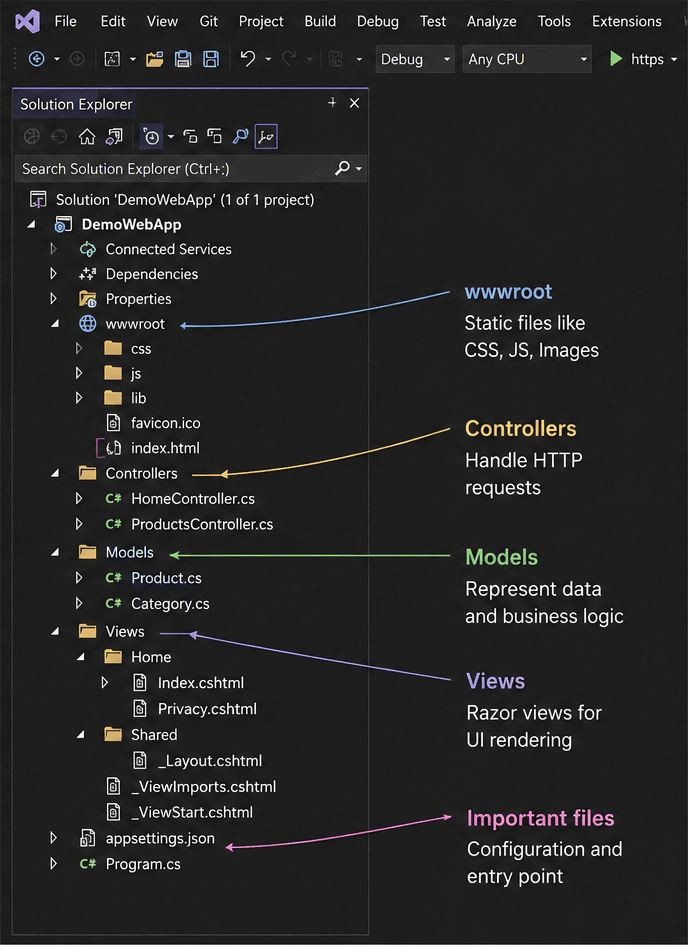
In this view, you can clearly see Controllers, Models, Views, and wwwroot folders organized in a structured way.
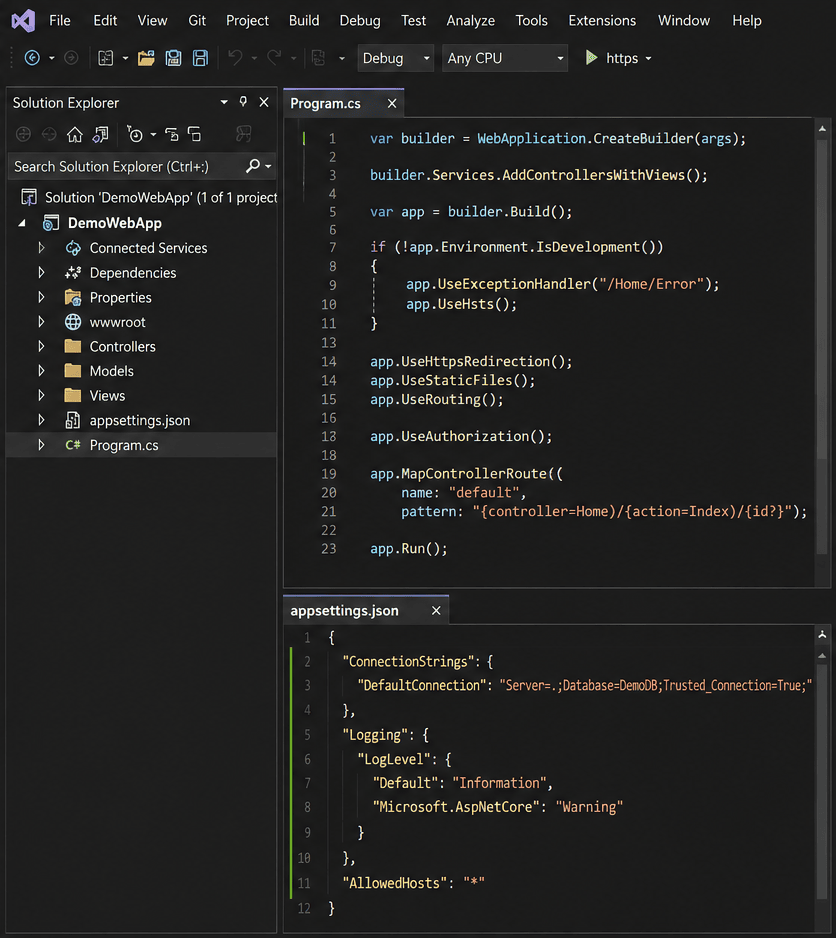
This shows important files like Program.cs and appsettings.json which control application startup and configuration.
Advanced ASP.NET Core Project Structure (Real Projects)
In enterprise applications, developers extend the default structure to follow Clean Architecture principles.
- Services Folder – Contains business logic
- Repositories Folder – Handles database operations
- DTOs Folder – Used for safe data transfer between layers
- Middleware Folder – Custom request pipeline logic
- Extensions Folder – Reusable helper methods
This structure helps in building large scalable systems with better separation of concerns.
Best Practices for ASP.NET Core Project Structure
- Keep controllers thin and focused only on request handling
- Move business logic to service layer
- Use DTOs instead of exposing database models directly
- Organize code based on features in large applications
- Follow consistent naming conventions across the project
Common Mistakes Developers Should Avoid
- Placing business logic inside controllers
- Mixing UI and backend logic in same layer
- Skipping service layer in small projects
- Overloading models with multiple responsibilities
- Ignoring separation of concerns
Real-World ASP.NET Core Folder Structure Example
/Controllers
/Models
/Views
/Services
/Repositories
/DTOs
/Middleware
/Extensions
/wwwroot
Program.cs
appsettings.json
Benefits of Proper Folder Structure
- Cleaner and more maintainable code
- Faster development workflow
- Easier debugging and testing
- Better collaboration in teams
- Scalable architecture for enterprise apps
Conclusion and Next Step
A proper ASP.NET Core project structure is the foundation of any professional application. It ensures scalability, maintainability, and clean separation of concerns.
By following best practices like using service layers, keeping controllers lightweight, and organizing files properly, developers can build enterprise-level applications efficiently.
Once you master ASP.NET Core folder structure, you can confidently design clean architecture systems for real-world applications.
A well-structured directory layout makes your software project maintainable and scalable. To master project organization and backend design, consult our comprehensive ASP.NET Core Tutorial: Complete Guide for Beginners to Advanced. Walk through hands-on project creation in How to Create an ASP.NET Core Project Step by Step, manage settings in What is appsettings.json in ASP.NET Core, and learn request handling via Middleware in ASP.NET Core Explained.