ASP.NET Core Lifecycle Explained – Complete Request Pipeline Guide for Developers

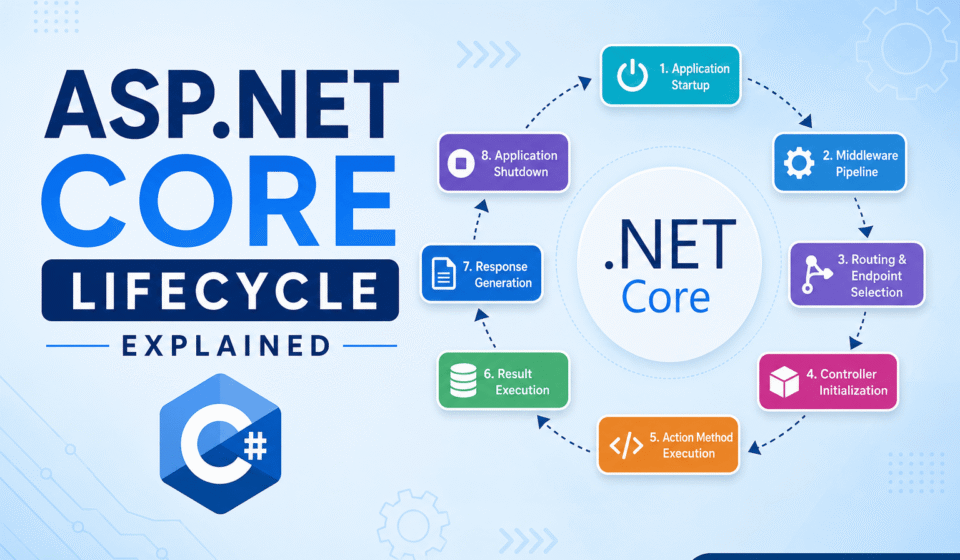
ASP.NET Core lifecycle explained is one of the most important concepts for modern .NET developers. Understanding how requests move through middleware, routing, dependency injection, controllers, and response generation helps developers build scalable and optimized applications. Many beginners directly create APIs and MVC projects without learning the internal request pipeline, which later creates debugging and performance issues in enterprise applications.
ASP.NET Core uses a lightweight and modular architecture where every HTTP request passes through multiple processing stages before the final response reaches the client browser or frontend application. These stages include startup configuration, middleware execution, endpoint routing, controller processing, database communication, and response handling.
Developers who understand the internal request lifecycle can easily optimize performance, improve middleware configuration, handle authentication correctly, and troubleshoot routing problems efficiently.
ASP.NET Core Lifecycle Explained: Request Processing Overview
The request processing lifecycle mainly contains several important stages that work together to handle incoming HTTP requests efficiently.
- Application Startup
- Host Configuration
- Service Registration
- Middleware Execution
- Routing and Endpoint Matching
- Controller Action Processing
- Database Operations
- Response Generation
- Application Shutdown
Every request passes through these stages internally. The framework is designed in a highly optimized way so applications can process thousands of requests efficiently.
Application Startup in ASP.NET Core
The application lifecycle begins from the Program.cs file where the application host is created. During startup, configuration files are loaded, services are registered, middleware components are configured, and the web server starts listening for incoming requests.
var builder = WebApplication.CreateBuilder(args);

builder.Services.AddControllers();

var app = builder.Build();

app.MapControllers();

app.Run();
Startup configuration is extremely important because incorrect setup may create dependency injection failures, middleware errors, or authentication problems.
The MVC Routing Pipeline in ASP.NET Core
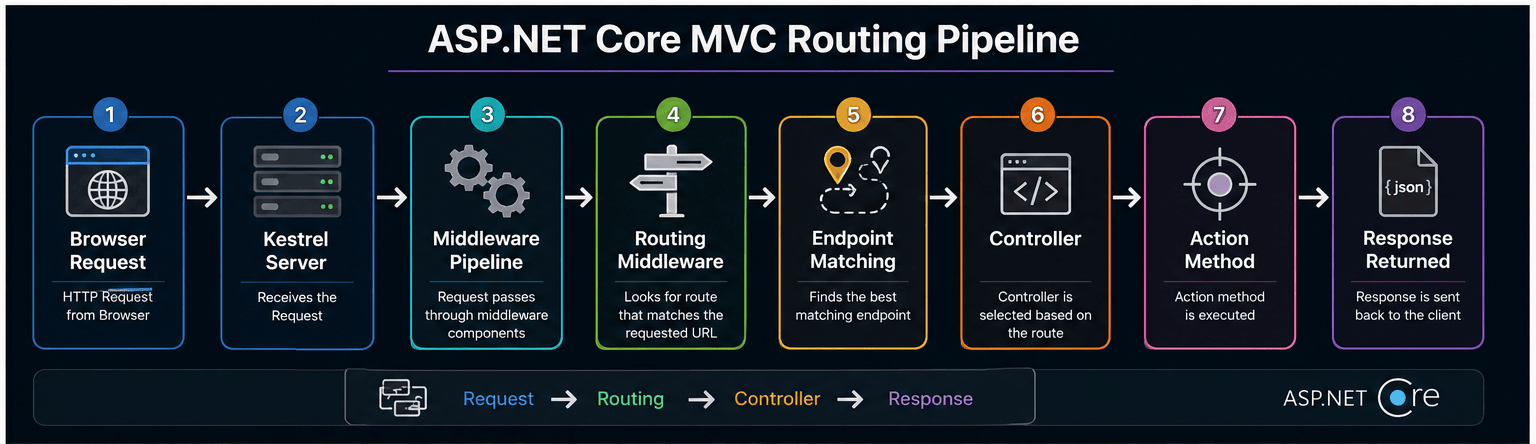
The ASP.NET Core MVC Request Life Cycle is a sequence of stages and components that work together to process incoming HTTP requests and generate responses for browsers or frontend applications. The MVC routing pipeline plays one of the most important roles inside the framework because it decides how incoming URLs are mapped to controllers and action methods.
Routing acts as a middleware component inside the ASP.NET Core request pipeline. Whenever a request reaches the application, the routing system checks the incoming URL pattern and tries to match it with available routes configured inside the application.
app.UseRouting();

app.UseEndpoints(endpoints =>
{
    endpoints.MapControllerRoute(
        name: "default",
        pattern: "{controller=Home}/{action=Index}/{id?}");
});
In the above example, the routing middleware maps incoming URLs to controller actions using a default route template.
Convention-Based Routing
Convention routing uses predefined URL patterns for the entire application.
app.MapControllerRoute(
    name: "default",
    pattern: "{controller=Home}/{action=Index}/{id?}");
Attribute-Based Routing
Attribute routing is directly applied above controller classes or action methods using attributes.
[Route("api/products")]
public class ProductsController : Controller
{
    [HttpGet]
    public IActionResult GetProducts()
    {
        return Ok();
    }
}
Middleware Flow in ASP.NET Core Lifecycle
Middleware components are software modules that execute sequentially for every request. Each middleware can process the request, modify response data, stop execution, or pass the request to the next middleware component.
app.UseHttpsRedirection();
app.UseAuthentication();
app.UseAuthorization();
Middleware ordering is very important inside ASP.NET Core applications. Authentication middleware should execute before authorization middleware to ensure proper security validation.
Common middleware examples include logging, exception handling, static file serving, authentication, authorization, and CORS handling.
Controller Initialization in ASP.NET Core MVC
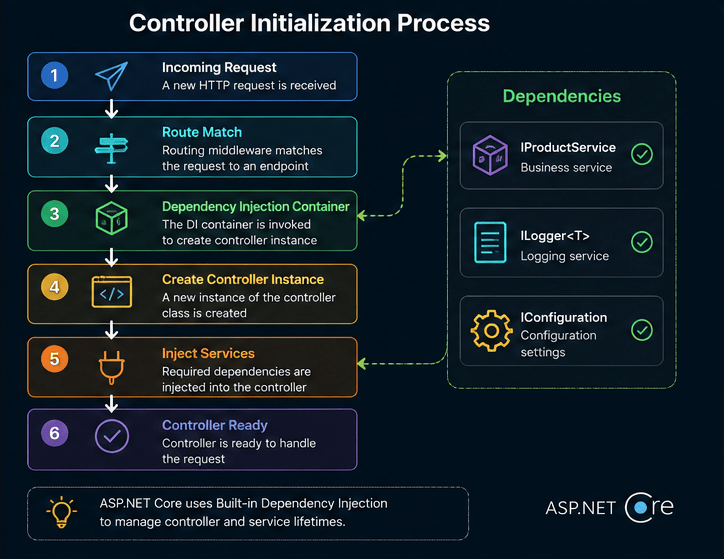
After the routing middleware successfully identifies the correct endpoint, the next stage of the ASP.NET Core lifecycle is controller initialization. Controllers are responsible for handling incoming requests and generating responses.
public class ProductController : Controller
{
    private readonly IProductService _productService;

    public ProductController(IProductService productService)
    {
        _productService = productService;
    }
}
During this stage, the framework creates an instance of the controller class using the built-in dependency injection system.
- Dependency Injection Support
- Action Filter Support
- Authorization Handling
- Request Context Access
- Model Binding Integration
Action Method Execution Process
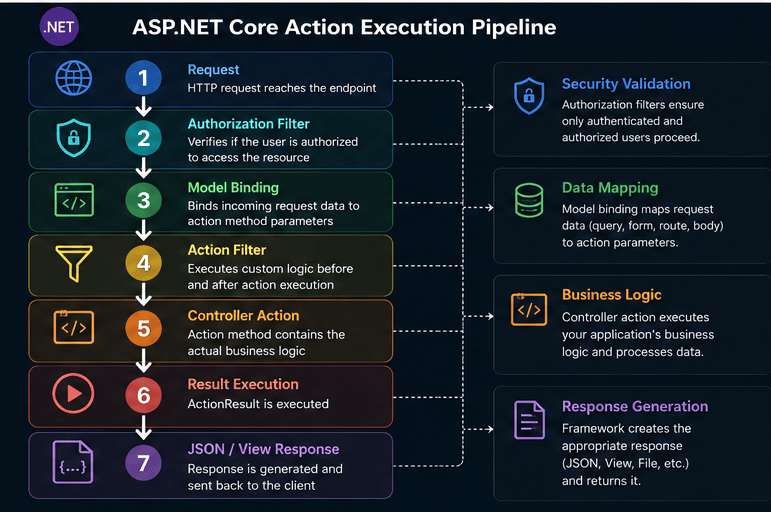
The action method execution stage is responsible for running the actual business logic of the application. Action methods are public methods inside controllers that process requests and generate responses.
public class HomeController : Controller
{
    public IActionResult Index()
    {
        return View();
    }
}
Authorization Filters
Authorization filters verify whether the current user has permission to access the requested resource.
[Authorize]
public IActionResult Dashboard()
{
    return View();
}
Model Binding
Model binding maps incoming request data to action method parameters automatically.
public IActionResult Edit(int id)
{
    return Content(id.ToString());
}
Action Filters
Action filters allow developers to execute custom logic before and after action method execution.
public class LogActionFilter : ActionFilterAttribute
{
    public override void OnActionExecuting(ActionExecutingContext context)
    {
        base.OnActionExecuting(context);
    }
}
Result Execution
After action method execution completes, ASP.NET Core generates the final response. The response may contain HTML content, JSON data, files, redirects, or status codes.
public IActionResult Details()
{
    return Json(new { Name = "Laptop", Price = 50000 });
}
Benefits of Understanding ASP.NET Core Lifecycle
- Better debugging and troubleshooting
- Improved application performance
- Efficient middleware management
- Better security implementation
- Optimized dependency injection usage
- Improved scalability for enterprise applications
Understanding the exact execution lifecycle allows you to build high-performance web systems. Take your understanding further with our exhaustive ASP.NET Core Tutorial: Complete Guide for Beginners to Advanced. See how HTTP requests move through pipelines in Middleware in ASP.NET Core Explained, manage service lifetimes with Dependency Injection in ASP.NET Core, and optimize application speeds in ASP.NET Core Performance Optimization Guide.
Official Documentation
Read official Microsoft documentation: