
Middleware in ASP.NET Core Explained: Request Pipeline Made Simple
What is Middleware in ASP.NET Core?
Middleware in ASP.NET Core is a software component responsible for handling HTTP requests and responses within the application pipeline. Whenever a client sends a request to the server, the request passes through multiple middleware components before reaching the controller or API endpoint. Each middleware component performs a specific task such as authentication, authorization, logging, routing, caching, or exception handling. As a result, middleware creates a structured and modular request-processing architecture for modern web applications.
ASP.NET Core uses a middleware-based architecture to improve scalability, maintainability, and application performance. Instead of placing all functionality inside controllers, developers can separate infrastructure concerns into reusable middleware components. Moreover, middleware allows developers to customize how requests and responses are processed, making the framework highly flexible for enterprise-level applications and cloud-native services.
A simple way to understand middleware is to imagine a sequence of checkpoints. A request enters the application, passes through several checkpoints, and finally reaches the required endpoint. Each checkpoint can inspect or modify the request. It can also perform an action after the next component finishes. This request-and-response model gives developers precise control over application behavior without creating unnecessary logic inside controllers.
Why Middleware is Important?
Middleware plays a critical role in modern ASP.NET Core applications because it controls the entire request execution flow. For example, authentication middleware validates user identity before the request reaches secured endpoints, while authorization middleware verifies access permissions. Similarly, exception handling middleware captures runtime errors and returns user-friendly responses. Therefore, middleware improves application security, debugging, monitoring, and maintainability.
Another major advantage is flexibility. Developers can configure middleware components in different sequences depending on project requirements. However, middleware order is extremely important because every component executes sequentially inside the request pipeline. If middleware is configured incorrectly, authentication, authorization, or routing may fail. Consequently, understanding middleware execution order is essential for building secure and optimized applications.
Middleware also helps keep controllers focused on application responsibilities. A controller should generally handle business operations rather than repeatedly performing logging, security checks, exception processing, or response headers. By moving cross-cutting concerns into middleware, developers can follow cleaner architectural practices. Furthermore, centralized processing makes future changes easier because one middleware component can serve many controllers and API endpoints.
Popular Middleware Components
- Authentication Middleware
- Authorization Middleware
- Routing Middleware
- Static File Middleware
- Exception Handling Middleware
- CORS Middleware
- Response Compression Middleware
These components address common requirements in web applications. Static file middleware serves resources such as CSS, JavaScript, and images, while CORS middleware controls cross-origin requests. Authentication and authorization protect application resources, whereas exception handling provides a consistent approach to unexpected failures. Depending on the application, developers can also add custom logging, caching, rate limiting, or monitoring middleware.
How the ASP.NET Core Request Pipeline Works
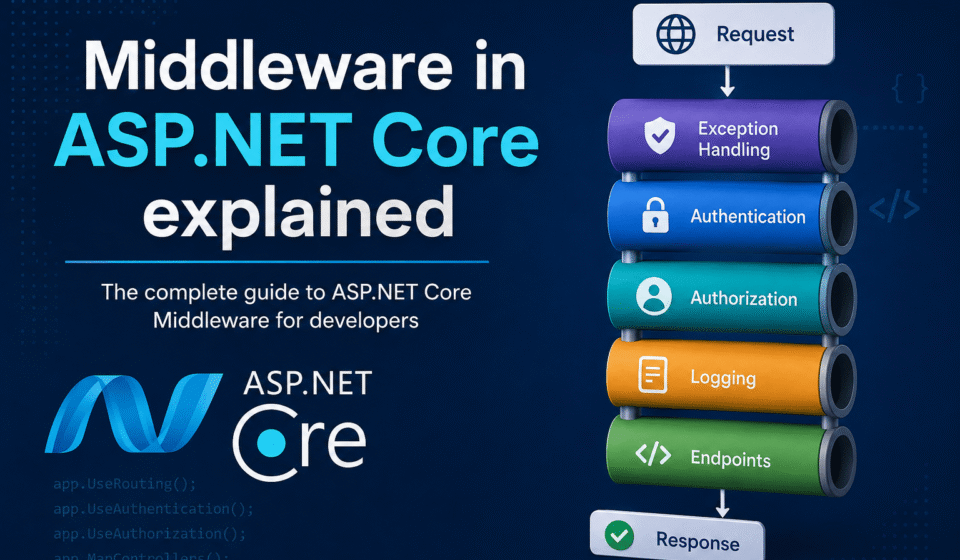
The ASP.NET Core request pipeline works in a sequential manner where each middleware component receives the request, processes it, and forwards it to the next middleware. Furthermore, a middleware component can stop the pipeline and directly return a response if required. Because of this behavior, middleware ordering becomes one of the most important parts of ASP.NET Core application configuration.
app.UseAuthentication();
app.UseAuthorization();
app.MapControllers();
In the example above, authentication middleware executes first to validate the user identity. After that, authorization middleware checks whether the authenticated user has permission to access the requested resource. Additionally, routing middleware maps the request to the correct controller or endpoint. This structured execution flow helps developers build secure, clean, and maintainable web applications.
The pipeline can also execute code on the way back to the client. For example, a middleware component can perform an action before calling the next component and then perform another action after the response returns. This behavior is useful for measuring request duration, adding response headers, recording status codes, or implementing centralized diagnostics. Therefore, the pipeline is not simply a one-way request chain.
Middleware order should always be reviewed when troubleshooting unexpected behavior. For instance, placing authorization logic before the required authentication process can cause authenticated requests to be rejected. Similarly, incorrect routing configuration can prevent endpoints from being selected. In production applications, developers should test the complete pipeline with anonymous users, authenticated users, invalid requests, and authorization failures.
Middleware Execution Order
Middleware execution order determines which operation happens first and which operation happens later. A typical application may process exception handling, HTTPS redirection, static files, routing, CORS, authentication, authorization, and endpoint execution. The exact sequence depends on the application’s requirements and the ASP.NET Core version being used. Therefore, developers should understand the purpose of every registered component before changing its position.
A common mistake is adding middleware without considering its dependencies. For example, authentication must establish the user identity before authorization evaluates access. Likewise, CORS configuration should be placed where it can correctly affect the endpoints that require cross-origin access. As a result, carefully reviewing the pipeline can prevent difficult production issues that may otherwise appear as random authentication or API failures.
Custom Middleware in ASP.NET Core
ASP.NET Core also allows developers to create custom middleware for advanced business requirements. Custom middleware can be used for API request logging, performance monitoring, request validation, response transformation, IP filtering, and audit tracking. In addition, reusable middleware components reduce duplicate code and improve development productivity. Therefore, custom middleware is widely used in enterprise applications, REST APIs, and microservices architectures.
A custom middleware component normally receives an HTTP context and a delegate representing the next component in the pipeline. It can inspect request information before calling that delegate and inspect response-related information afterward. This design makes custom middleware suitable for cross-cutting concerns that should apply consistently across multiple endpoints. However, business rules that belong to a specific feature should usually remain in the appropriate service or application layer.
As applications continue to scale, middleware architecture becomes even more valuable because it simplifies maintenance and improves request processing efficiency. Understanding middleware concepts is essential for developers who want to build high-performance, scalable, and production-ready ASP.NET Core applications.
When creating custom components, performance should also be considered carefully. Middleware executes for every request that reaches its position in the pipeline. Therefore, expensive database calls, unnecessary file operations, or complex calculations inside globally registered middleware can increase application latency. Whenever possible, keep middleware lightweight, use asynchronous operations for I/O, and avoid blocking threads during request processing.
Custom Middleware Best Practices
Good middleware should have one clear responsibility and should be easy to test independently. Developers should avoid placing large amounts of business logic inside a middleware class because that can make the application harder to maintain. Instead, middleware can delegate complex operations to services through dependency injection. This approach keeps the request pipeline simple while still allowing enterprise applications to implement advanced processing rules.
Security is another important consideration. Middleware that records requests should avoid logging passwords, authentication tokens, personal information, or other sensitive values. Similarly, validation middleware should fail safely and return appropriate HTTP status codes. In production systems, logging should provide enough information for troubleshooting without exposing confidential data. These practices become especially important when applications run in shared cloud environments.
Middleware Performance and Scalability
Middleware can influence application performance because every request may pass through several components before reaching an endpoint. A well-designed pipeline adds only the processing that is genuinely required. Developers should remove unnecessary middleware, avoid synchronous I/O, and measure expensive operations with application monitoring tools. Moreover, response compression, caching, and efficient logging can improve performance when they are configured appropriately.
For large enterprise systems, middleware can also support consistent operational policies across many APIs. For example, centralized request correlation, security headers, audit logging, and error handling can be implemented once instead of being duplicated across individual controllers. As a result, middleware contributes to scalability from both a technical and maintenance perspective. However, developers should still monitor CPU usage, memory consumption, request latency, and downstream dependencies.
Common Middleware Mistakes
One of the most common mistakes is assuming that middleware order does not matter. Since the request pipeline is sequential, moving one component can change application behavior. Another frequent problem is performing too much work in globally executed middleware. This can increase response time for every request, including endpoints that do not need the additional processing.
Developers should also avoid using middleware as a replacement for every application-layer pattern. Middleware is best suited to concerns that cross multiple requests or endpoints. Feature-specific validation, calculations, and business decisions are usually better placed in services or domain logic. Furthermore, middleware should handle cancellation, exceptions, and asynchronous operations carefully to avoid resource leaks and unnecessary server load.
Middleware in ASP.NET Core for Production Applications
In production applications, middleware in ASP.NET Core should be designed with reliability, security, observability, and performance in mind. A production pipeline may include centralized exception handling, HTTPS enforcement, security headers, CORS, authentication, authorization, request logging, and endpoint mapping. The exact configuration depends on the application’s architecture, but every component should have a clear purpose.
Before deployment, teams should verify the pipeline using realistic scenarios. Test successful authentication, failed authentication, insufficient permissions, invalid requests, unexpected exceptions, large payloads, and cross-origin requests. Additionally, review logs to confirm that sensitive information is not exposed. These checks help identify configuration problems before they affect real users and make the application easier to operate after deployment.
If you are migrating an older ASP.NET application to ASP.NET Core, middleware is one of the architectural concepts worth understanding early. Older applications may rely heavily on HTTP modules, handlers, or global application events. ASP.NET Core replaces many of these patterns with a unified middleware pipeline. A careful migration should map each existing cross-cutting concern to the most suitable ASP.NET Core component.
If you are building production-ready applications, understanding middleware in ASP.NET Core is just one piece of the puzzle. To master the entire architecture, explore our detailed ASP.NET Core Tutorial: The Complete Guide for Beginners to Advanced. For implementing modular code, dive into Dependency Injection in ASP.NET Core, ensure robust error recovery via Exception Handling in ASP.NET Core, and secure your API pipeline using JWT Authentication in ASP.NET Core.
Useful Resources
Read Microsoft official documentation here:
Official ASP.NET Core Middleware Documentation
Conclusion
Middleware in ASP.NET Core provides a powerful way to control HTTP request and response processing. By separating authentication, authorization, logging, exception handling, CORS, and other cross-cutting concerns, developers can create cleaner and more maintainable applications. Moreover, understanding execution order helps prevent security, routing, and performance problems.
For beginners, the most important concept is to remember that middleware forms a processing chain. Each component can inspect the request, perform an operation, call the next component, and process the response afterward. For experienced developers, the focus should move toward efficient pipeline design, observability, security, scalability, and production troubleshooting.
If you want to build reliable APIs and enterprise applications, start by understanding the request pipeline and then practice creating small custom components. Review middleware order carefully, keep each component focused, and measure performance in realistic environments. With these practices, middleware in ASP.NET Core becomes a practical foundation for secure, scalable, and production-ready applications.
SEO Title: Middleware in ASP.NET Core: Request Pipeline Guide
Meta Description: Learn middleware in ASP.NET Core, request pipeline order, custom middleware, performance, security, scalability, and production best practices.
Slug: middleware-in-aspnet-core
Focus Keyphrase: Middleware in ASP.NET Core
Synonyms: ASP.NET Core middleware, middleware pipeline, request pipeline, ASP.NET Core request pipeline
OG Title: Middleware in ASP.NET Core Explained: Request Pipeline
OG Description: Understand middleware in ASP.NET Core, pipeline execution order, custom middleware, performance, security, and production best practices.