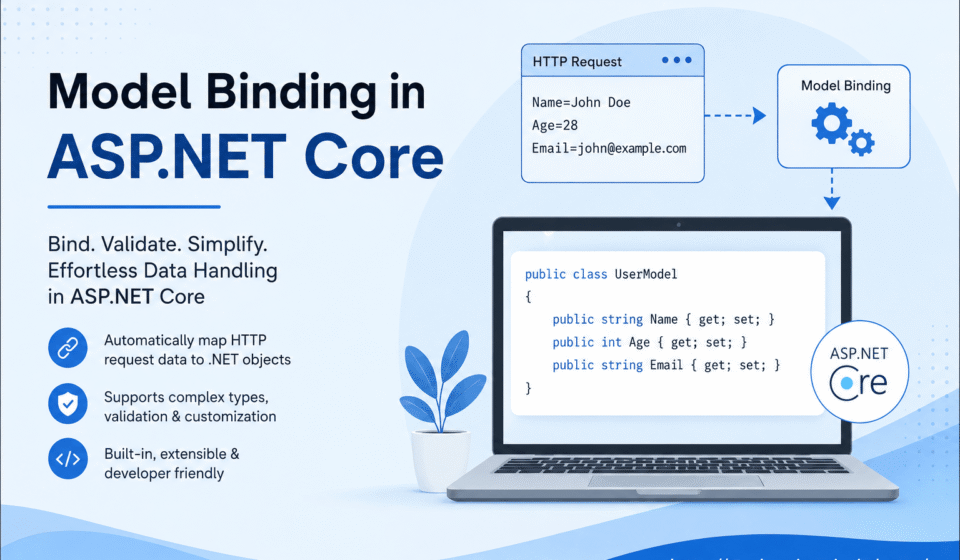

What is Model Binding in ASP.NET Core?
Model Binding in ASP.NET Core is a built-in framework feature that automatically maps incoming HTTP request data to C# objects, controller action parameters, and model classes.
It removes the need for developers to manually extract values from forms, query strings, route parameters, and JSON request bodies.
This automation makes ASP.NET Core applications cleaner, faster, and easier to maintain.
Instead of writing repetitive parsing logic, developers can directly work with strongly typed objects and focus on business functionality.
In modern web application development, handling user input efficiently is extremely important.
ASP.NET Core simplifies this process through Model Binding, allowing developers to create scalable APIs and MVC applications with minimal boilerplate code.
Whether you are building a simple contact form or a large enterprise REST API, Model Binding plays a critical role in request processing.
Overview of ASP.NET Core Model Binding
ASP.NET Core Model Binding works during the request processing lifecycle.
When an HTTP request reaches a controller action, the framework automatically reads data from different request sources and converts it into .NET objects.
This process happens behind the scenes and helps developers avoid unnecessary manual coding.
The framework can retrieve values from multiple request sources such as:
- Form Fields
- Route Parameters
- Query Strings
- HTTP Headers
- JSON Request Bodies
- Cookies
After collecting request values, ASP.NET Core matches them with model property names and converts them into the appropriate data types automatically.
This feature significantly improves productivity and reduces the chances of coding errors.
Details and Analysis
Model Binding follows naming conventions for matching request data with model properties.
If a request parameter name matches a model property name, the framework binds the value automatically.
This behavior works for primitive types, complex objects, collections, and nested models.
ASP.NET Core also supports advanced binding scenarios such as custom binders, binding source attributes, and nested object mapping.
Developers can customize the binding process when working with complex business requirements or third-party integrations.
One of the biggest advantages of Model Binding is its integration with validation features.
Validation attributes such as [Required], [EmailAddress], [Range], and [StringLength] can be directly applied to model properties.
Before controller logic executes, ASP.NET Core validates the incoming request automatically and stores validation results in the ModelState object.
This validation mechanism helps developers create secure and reliable applications by preventing invalid or malicious data from entering the application layer.
Examples and Case Studies
The following example demonstrates a simple Model Binding implementation:
public IActionResult Create(UserModel user)
{
    return View();
}
In this example, ASP.NET Core automatically maps incoming form values or request body data to the UserModel object.
Developers do not need to manually retrieve data using Request.Form or Request.Query.
In real-world applications, Model Binding is heavily used in REST APIs.
For example, e-commerce platforms use it for product creation forms, payment processing APIs, order management systems, and customer registration modules.
Social media applications also use Model Binding to process profile updates, authentication requests, and messaging systems.
Enterprise applications benefit greatly from this feature because it reduces repetitive code and improves maintainability across large projects.
Solutions and Actionable Tips
- Use strongly typed models for better maintainability
- Apply validation attributes for secure request handling
- Use DTOs instead of exposing database entities directly
- Keep models small and focused on single operations
- Use custom model binders for complex scenarios
- Validate ModelState before executing business logic
- Combine Model Binding with dependency injection for cleaner architecture
Developers should also avoid overposting vulnerabilities by binding only required properties.
Using dedicated request models improves both security and performance in large-scale applications.
Conclusion And Next Step
Model Binding in ASP.NET Core is one of the most important features for building modern web applications and APIs.
It automates request data mapping, simplifies controller logic, improves code readability, and increases development productivity.
By understanding how Model Binding works internally, developers can create scalable, secure, and maintainable enterprise-grade applications.
Whether you are working on small MVC projects or large cloud-based APIs, mastering Model Binding will help you write cleaner backend code and improve overall application architecture.
Seamless data flow from HTTP requests to backend models ensures robust application behavior. For a holistic view of the development lifecycle, dive into our ASP.NET Core Tutorial: Complete Guide for Beginners to Advanced. Learn how incoming URL patterns map to actions in Routing in ASP.NET Core, apply data validation within How to Create an ASP.NET Core Web API, and handle binding failures smoothly with Exception Handling in ASP.NET Core.