

Routing in ASP.NET Core: Complete Beginner to Advanced Guide
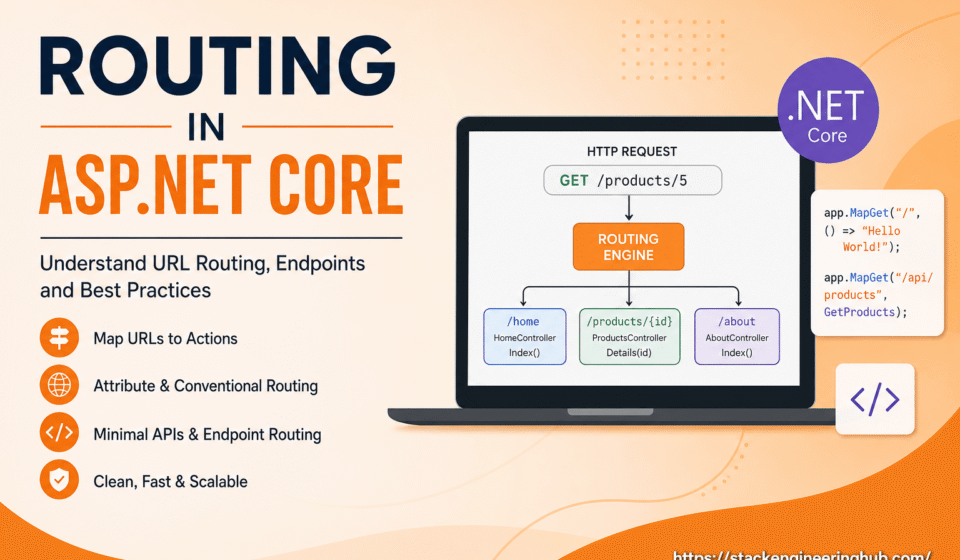
Routing in ASP.NET Core is one of the first components that process every request in an ASP.NET Core application. Before a controller action, Razor Page, or Minimal API endpoint executes, the routing engine evaluates the requested URL and identifies the most appropriate endpoint. This process happens quickly and efficiently, allowing applications to handle thousands of requests with minimal overhead.
For beginners, it is helpful to think of routing as a navigation system. Just as a GPS determines the correct path to a destination, the ASP.NET Core routing system determines which controller or endpoint should process an incoming request. Without routing, every request would require manual handling, making applications difficult to build and maintain.
Modern applications often expose dozens or even hundreds of URLs. A flexible routing system keeps these URLs organized while allowing developers to modify application logic without changing the overall navigation structure. This separation improves maintainability and supports long-term application growth.
Routing also contributes to better search engine optimization by enabling meaningful and descriptive URLs. Instead of exposing technical file names or complex query strings, developers can create clean URL patterns that are easier for both users and search engines to understand.
Every HTTP request in an ASP.NET Core application follows a request pipeline before reaching its destination. Routing acts as the decision-making component within this pipeline, ensuring that every request is forwarded to the correct controller, Razor Page, or API endpoint. Because of this responsibility, routing has a direct impact on application performance and maintainability.
Whether you are building an eCommerce platform, banking application, content management system, or enterprise API, routing is involved in almost every user interaction. A well-designed routing strategy reduces complexity, improves navigation, and makes future application updates much easier for development teams.
Overview of Routing in Web Applications
Every web application receives HTTP requests from browsers, mobile applications, or external services. The routing engine examines each request and compares the requested URL with the routes configured inside the application. Once a matching route is found, the request is forwarded to the appropriate controller, Razor Page, or API endpoint.
This routing mechanism allows developers to separate URL structures from application implementation. As a result, controllers and actions can evolve over time while keeping public URLs stable. This flexibility becomes especially valuable for enterprise applications that continue to grow over several years.
ASP.NET Core endpoint routing also works seamlessly with middleware components such as authentication, authorization, logging, caching, and exception handling. Since routing is integrated into the request pipeline, developers can build secure and scalable applications without introducing unnecessary complexity.
Large organizations frequently use consistent routing conventions across multiple projects. Standardized route structures simplify maintenance, improve collaboration between development teams, and make API documentation easier to understand for internal and external consumers.
Clean URLs also improve user confidence. Visitors can easily understand the purpose of a page simply by looking at the address bar. Instead of long URLs containing unnecessary query parameters, routing enables meaningful addresses that are both user-friendly and SEO-friendly.
From a developer’s perspective, routing removes the need to manually inspect incoming URLs. The framework automatically matches requests against configured routes, allowing developers to focus on implementing business logic instead of request handling.
In enterprise environments, applications frequently expose hundreds of endpoints across multiple modules. A standardized routing strategy ensures consistency across development teams and simplifies long-term maintenance. New developers can quickly understand the application’s navigation structure without reviewing every controller individually.
Another benefit of routing is improved scalability. As applications grow, new controllers and endpoints can be introduced without affecting existing URLs when proper routing conventions are followed. This reduces breaking changes and improves backward compatibility.
Conventional Routing in ASP.NET Core
Conventional routing is based on predefined route templates that automatically map incoming requests to controllers and action methods. This approach reduces configuration effort because developers define a general routing pattern instead of configuring every endpoint individually.
In MVC applications, conventional routing works particularly well because controllers generally follow predictable naming conventions. As developers create new controllers and actions, they automatically become accessible through the configured route template without additional route definitions.
app.MapControllerRoute(
    name: "default",
    pattern: "{controller=Home}/{action=Index}/{id?}");
In this example, the default controller is Home and the default action is Index. The optional id parameter can be used to pass dynamic values through the URL.
Conventional routing is simple to configure and works well for applications with a predictable URL structure.
For example, if an application contains a ProductsController with a Details action, the default route automatically generates URLs such as /Products/Details/10. This predictable behavior reduces development effort while maintaining consistency throughout the application.
Conventional routing also supports optional route parameters, making it possible to create flexible URL structures. Optional parameters allow the same route template to process multiple request variations without requiring additional configuration.
Another advantage is centralized route management. Developers can modify the default routing pattern in one place rather than updating every individual controller. This approach improves maintainability and minimizes configuration errors during application updates.
However, conventional routing is not always the best choice. Applications with highly customized REST endpoints often require more precise control over URL patterns. In such scenarios, attribute routing provides greater flexibility and clearer route definitions.
Developers should also avoid unnecessarily complex route templates. Short, descriptive URLs are easier to understand, improve application usability, and contribute to better search engine optimization for public-facing websites.
Performance is another reason to follow routing best practices. Although ASP.NET Core routing is highly optimized, properly organized route templates reduce unnecessary route matching and help applications scale efficiently under heavy traffic.
Attribute Routing for APIs
Attribute routing allows developers to define routes directly on controllers or action methods using attributes. This approach provides better control over route management and is widely used in RESTful APIs.
Unlike conventional routing, attribute routing keeps route definitions close to the code that handles incoming requests. This makes controllers easier to understand because developers can immediately identify which URL maps to a particular action method without reviewing centralized route configuration.
Modern ASP.NET Core Web APIs primarily rely on attribute routing because REST endpoints often require unique URL structures. This flexibility enables developers to design intuitive APIs that follow industry standards while remaining easy to maintain.
[Route("api/products")]
public class ProductsController : Controller
{
    [HttpGet]
    public IActionResult GetProducts()
    {
        return Ok();
    }
}
Attribute routing improves readability and makes complex route structures easier to maintain. It is especially useful in enterprise-level API development.
In the above example, the Route attribute defines the base URL, while the HttpGet attribute specifies that the action responds to HTTP GET requests. ASP.NET Core combines these attributes to create the final endpoint that clients can access.
Developers can also define HTTP POST, PUT, DELETE, and PATCH endpoints using attributes such as [HttpPost], [HttpPut], [HttpDelete], and [HttpPatch]. This keeps API controllers organized and clearly communicates the purpose of each action.
Another benefit of attribute routing is support for route parameters. For example, a route such as api/products/{id} allows applications to retrieve a specific product based on its identifier. This approach creates predictable and developer-friendly API endpoints.
Enterprise applications frequently use attribute routing together with API versioning. Separate route templates such as api/v1/products and api/v2/products allow new functionality to be introduced without affecting existing client applications.
Developers should avoid creating duplicate or conflicting routes because they can lead to ambiguous endpoint matching. Following consistent naming conventions across controllers helps reduce maintenance effort and improves long-term scalability.
Endpoint Routing and Minimal APIs
ASP.NET Core introduced endpoint routing to improve routing performance and middleware integration. Endpoint routing enables developers to define lightweight APIs with minimal configuration.
Endpoint routing provides a unified routing model for MVC, Razor Pages, SignalR, gRPC, and Minimal APIs. Instead of maintaining separate routing mechanisms for different frameworks, ASP.NET Core processes every endpoint through a single optimized routing engine.
This architecture improves performance because route matching occurs only once during the request lifecycle. The selected endpoint then flows through the remaining middleware components before generating the final response.
app.MapGet("/", () => "Hello World!");
Minimal APIs are becoming increasingly popular because they reduce boilerplate code and simplify small service development.
Minimal APIs are an excellent choice for microservices, internal business services, proof-of-concept projects, and cloud-native applications. Developers can expose HTTP endpoints with only a few lines of code while still benefiting from dependency injection, logging, configuration, and middleware support.
Although Minimal APIs reduce code complexity, they still support many advanced ASP.NET Core capabilities including authentication, authorization, model binding, validation, and OpenAPI documentation. This makes them suitable for both simple and production-ready applications.
When choosing between MVC controllers and Minimal APIs, developers should consider project size and future maintenance. Large enterprise applications often benefit from controllers because they provide better organization, while smaller services frequently gain productivity from Minimal APIs.
Performance is another major advantage of endpoint routing. The routing engine has been optimized to process requests efficiently, making ASP.NET Core one of the highest-performing web frameworks available for modern application development.
Best Practices for Route Management
Use Clean and Readable URLs
Readable URLs improve user experience and help search engines understand application content more effectively.
Developers should use lowercase URLs, meaningful resource names, and consistent naming conventions throughout the application. Predictable URL structures improve usability and simplify API documentation.
Avoid exposing implementation details such as physical folder names or technology-specific information in URLs. Clean routes remain stable even when the application’s internal architecture changes.
Keep Routes Organized
Large applications should organize routes based on features or modules to improve maintainability and scalability.
Grouping related controllers together makes navigation easier for development teams and reduces the possibility of duplicate or conflicting route definitions. This organizational approach becomes increasingly important as projects continue to grow.
Many organizations establish routing standards before development begins. Consistent conventions improve collaboration, reduce onboarding time for new developers, and simplify long-term maintenance.
Avoid Hardcoded URL Structures
Reusable route patterns make future updates easier and reduce duplication inside the application.
Hardcoded URLs increase maintenance effort because every reference must be updated whenever routing changes. Instead, developers should use route names and URL generation helpers whenever possible.
Automated integration testing is also recommended for routing. Testing verifies that important endpoints continue working correctly after code changes and helps identify routing issues before deployment.
Official Documentation:
Microsoft ASP.NET Core Routing Documentation
Conclusion And Next Step
Understanding routing is essential for every ASP.NET Core developer. A properly designed routing system improves application structure, performance, and scalability. Whether you are building MVC applications, REST APIs, or Minimal APIs, mastering routing concepts will help you create clean and professional web applications.
Routing is much more than mapping URLs to controllers. It forms the backbone of request processing and works together with middleware, dependency injection, authentication, authorization, model binding, and endpoint execution. A strong understanding of these components enables developers to build secure, scalable, and maintainable web applications.
From a performance perspective, ASP.NET Core routing is highly optimized for modern workloads. Nevertheless, developers should continue following routing best practices by using descriptive URLs, avoiding duplicate routes, organizing endpoints logically, and testing route behavior after every significant application update. These practices help maintain consistent performance as applications grow.
Enterprise applications often expose hundreds of API endpoints across multiple modules and services. A well-planned routing strategy makes these endpoints easier to organize, document, monitor, and secure. Consistent route naming conventions also simplify collaboration among development teams working on large software projects.
Routing also plays an important role in application security. Developers should validate route parameters, avoid exposing sensitive implementation details through URLs, and combine routing with authorization policies to ensure that only authenticated users can access protected resources. Proper routing configuration helps reduce the risk of unauthorized access and improves overall application reliability.
Another valuable practice is maintaining backward compatibility whenever possible. Existing client applications may depend on specific URL structures, so changing routes without proper planning can introduce breaking changes. API versioning, route aliases, and careful migration strategies help organizations evolve applications while minimizing disruption.
If you are preparing for ASP.NET Core interviews, expect questions related to conventional routing, attribute routing, endpoint routing, route parameters, optional parameters, route constraints, endpoint middleware, and Minimal APIs. Practical experience implementing these concepts is often more valuable than simply memorizing definitions.
A practical way to improve your routing skills is by creating sample applications that combine MVC controllers, Razor Pages, Web APIs, and Minimal APIs within the same project. Experiment with optional parameters, route constraints, custom templates, and middleware configuration to understand how ASP.NET Core processes requests under different scenarios.
As your projects become larger, consider documenting routing conventions for your entire development team. Consistent documentation reduces onboarding time for new developers, improves API usability, and helps maintain a predictable URL structure across multiple services and environments.
Mastering request routing is essential for designing scalable web architectures. To expand your knowledge across the entire framework, check out our master ASP.NET Core Tutorial: Complete Guide for Beginners to Advanced. You can also explore how routes bind data using Model Binding in ASP.NET Core, structure clean API endpoints in How to Create an ASP.NET Core Web API, and configure endpoint pipeline execution in Middleware in ASP.NET Core Explained.
By mastering the Routing System in ASP.NET Core, you establish a solid foundation for developing reliable, high-performance web applications. Whether your goal is to build enterprise business systems, cloud-native APIs, or modern microservices, understanding routing ensures that every incoming request reaches the correct destination efficiently. Continue exploring advanced ASP.NET Core concepts to strengthen your skills and build production-ready applications with confidence.


This guide really clarifies how the routing engine acts as the critical bridge between incoming URLs and the right controller actions. It’s especially helpful to see the breakdown of how this mapping works for both Razor pages and API endpoints in one place. Great resource for anyone looking to move from basic routing concepts to more advanced configurations.
Well explained! The routing flow breakdown makes complex concepts much easier to understand. Glad you found the API + Razor comparison useful 🙌